Showing posts with label Social Media. Show all posts

Thursday, 6 March 2014

How Upworthy Won the Internet and You Can, Too [INFOGRAPHIC]


If you're in the content marketing space, you have undoubtedly drooled at the epic rise to fame of Upworthy. The little site that could – Upworthy - has mushroomed to be the fastest growing site in the history of the Internet.

Question is, how? Having talented content marketers that have been successful in their own right helped. Proper financial backing helped. But what really helped the site “go viral?”

Among other things, how they couch the content with clever titles. Can titles do all that? Nope, but it gets you off to a good start when you take a classic title and make it a more emotional two-line title.

Something you might not have realized – Upworthy makes at least 25 titles for everything that goes to print. When was the last time you worked on that kind of an opener for your own content?

The following infographic, courtesy of Marketo usefully illustrates how Upworthy's tactics have put them on top - and how you can use these tactics for your own brand's voice. Do you already do some of these tactics? Let us know in the comments.

Upworthy Internet Infographic

Thursday, 27 February 2014

5 Reasons to Use Pinterest in Your Internet Marketing Strategy

5 Reasons to Use Pinterest in Your Internet Marketing Strategy


 Most of the people today are dependent on internet. Surfing through their computer or smartphones. We are consuming an ocean of data in our everyday lives. Admit it or not, we are becoming less interested in reading long articles. We are now more on browsing images that is good in our eyes. And business see this as an opportunity to use Pinterest in their marketing strategy.

WHAT IS PINTEREST?

Pinterest is an image-based social network allowing their users to explore, manage and share images and videos from their theme-based image collections. Each user have their virtual bulletin boards where they can create their electronic pinboards for their images. It is a place for people to discover new things, browse interesting images and share the things that they love.

It has 70 millions users which is a good factor for a business to promote their products/services. Pinterest is a good way to establish a greater brand awareness and also to increase traffic to your website.

WHY USE PINTEREST?

There are a lot of reasons on why business should use Pinterest with their marketing. And here are few essential reasons to check out:

Create Brand Awareness

It is obvious that business can really use Pinterest to promote their products or services with other users. Capture your current audience interests by creating beautiful and unique images to promote your brand. Let them remember your business by browsing photos and videos in your board. You can also gain new customers by doing this thing on Pinterest. Keep in mind that when you are creating images, always put them in appropriate categories and share with the right people. You can also share your customer's photo using your brand to show your followers that they trusted your business.

Increase Website Traffic

Another positive point in using Pinterest for business is it's ability to increase traffic for your website. It is very useful in building traffic and a lot of exposure for your business because every pin that you will share has an embedded link back to its original source. When you and your followers use a photo that links to your products, then you can get a high-quality backlinks for that. Not only that, you can also improve your search engine ranking by writing a concise descriptions and using the right keywords for your brand.

Engage with Users

Pinterest is all about interesting and great images. But we can also say that it is a social network at the core. Why? Because we can also engage with users, follow, comment, like and 'repin' their great stuff. It is a good platform to establish a good relationship and interact with your customers. If your followers like or comment on your photo, don't forget to thank them. You can ask them to repin your images and return the favor by sharing interesting stuff on their board.

Connect with other Social Networks

You are not just using Pinterest alone when you are promoting your brand through this website. You also have the opportunity to integrate your Pinterest to your Facebook or Twitter accounts. Pushing your pins to your other social media accounts will help you redirect your customers in your Pinterest. Letting them explore more of your product/service images and videos. They can share those photos in their own FB/Twitter accounts if they want. That is the best way to gain more followers or more potential customers.

Conduct Market Research

You can improve your business marketing strategy with the use of Pinterest. It is not only about promotion and getting traffics for your website. It is also about improving the way you market your brand. You can conduct a market research by the use of this platform. How? By observing the result of your pins. You have to know if you are pinning the right images that people are looking. Are these images interest other people? Do they like it by repinning or commenting on your photos? Are you able to maintain your current customers and gain new followers? Are you targeting the right market for your products/services? Doing a good report about the result of using this platform for your business will help you a lot in achieving success for your business.

START USING PINTEREST FOR FREE!

It is very simple to get started. All you have to do is go to Pinterest business page, and join as a business. Set-up your account for free! After verifying your website, you can now add the 'Pin It' or Follow' buttons to your site. Doing this will let your current and potential customers know that you are already using this social network. After signing up, you can now start creating your boards, browsing images and videos, and participate with other users on Pinterest.

Thursday, 16 January 2014

Twitter 201: Moving Beyond the Basics


Twitter has many nuances that can make it seem overwhelming when you’re new. Now that you’ve mastered the basics, what’s next? My friend Tara Kusumoto had some questions for me on how to use Twitter beyond the basis so I thought I’d share the questions and answers with you. I hope this Q & A will help demystify Twitter and find what’s next to help your Twitter account flourish.


From Tara: In my opinion, there are plenty of posts/resources out there about Twitter 101 (the basic how-to’s, posting, etc.) I’m not a total newbie, instead, where I (and many of my colleagues/friends) need help is more around Twitter 201: how to be more engaging and more efficient when interacting on Twitter. And as a subset, I’m curious about which specific tools to use to be more targeted and focused with the type of Tweets I’m seeing/interacting with.”


Below are Tara’s questions, which fit under the umbrella of “improving how to really engage with people” in this Twitter 201 post.

Question 1— What is your advice for effectively creating/using lists?


Twitter lists focus your time so they are important in that they help you be more efficient. The key to a good Twitter list is keeping them small about ten to twelve people per list is ideal. I like to give my lists fun names but keep your lists targeted and specific. Keep in mind that the people you add to your lists will see the titles so you want to be professional. Also, you’ll want to use names that will help you find them for future usage so don’t just number them. Be specific.


Some suggestions for lists:


1. People you want to tweet every time you’re on Twitter


2. Relevant people in your industry


3. New people you just met (People I want to get to know – rotate this list)


4. Blogs you like to follow


5. People who tweet great content that you can retweet
Question 2— What tools do you use to help manage/filter so much information and make sure you’re seeing what’s most important?


I have certain columns that I keep open in TweetDeck that organize my Twitter experience.


1. Mentions


2. Notifications


3. My fab people list that I want to follow closely.


4. Hashtag column if I’m working on something targeted.


I start by replying to my Twitter mentions as I try to respond to everyone that tweets me. I do my best to respond to questions and thoughtful tweets. This processes evolves over time. If you have a blog and it hopefully becomes more popular, it isn’t practical or smart to simply tweet a “thanks” tweet to each person that has shared your blog posts. It makes your Twitter stream look spammy to people who check your tweets.


I also look through the notifications to see if new people have followed me as well as what content is being tweeted.
Question 3— Would you recommend using something like TweetDeck, HootSuite, Radian6 — just one or a combination?


I use TweetDeck for all my personal tweeting and have for years. I also use HootSuite for work on other accounts that I manage on social media. If you manage more than one account or profile, it’s best to have the other accounts on separate Twitter clients then you know when you are on TweetDeck, you are tweeting your own personal tweets. If you’re an individual tweeting, you don’t need more than one. I would try Hootsuite and TweetDeck and see which interface appeals to you the most and does what you want.
Question 4— Can you offer some tips for the best way to track people who are high priority to follow/that you’re most interested in?


I use Twitter lists for this but also go to people’s Twitter page to make sure I don’t miss tweets from my VIPs. I always make sure I follow people right away if I’m interested in them. If I’m on the go and receive a tweet that I don’t want to miss responding to, I’ll favorite it so I can go back to it. You can also email a tweet to yourself. You could also create a custom timeline in Twitter to track a topic or person. From Twitter: ”There are four types of timelines available, all of which look and feel like timelines on twitter.com:”
User Timeline: Display public Tweets from any user on Twitter.
Favorites: Show all Tweets a specific user has marked as favorites.
List: Show Tweets from public lists that you own and/or subscribe to.
Search: Display customized search results in real time.
Question 5— Like all social media, images are really important; what is the best way to include pictures?


I add photos to Twitter in a few different ways. I add them straight to a tweet in Tweetdeck and I tweet them from Pinterest. The correct size for Twitter is 2:1 aspect ratio, I’ve been using 876 pixels by 438 pixels. Here’s an example of a tweet with an image that I sent with a larger image, it still looked awesome on Twitter and led to a great conversation with New York Times Best-selling author Chris Bohjalian about alpacas. I didn’t even know he followed me. Random conversations like this are part of the charm of Twitter.


Question 6— Like Facebook and Pinterest, I can get really distracted by Twitter; just a quick search or Tweet and then an hour’s passed! This is similar to my question above: any tips or tools for being more efficient with time spent on Twitter?


The best way to stay focused Twitter is to set a time limit and use a timer and use a task list. Sometimes I do both together. If I only have a short window of time, I respond to five or six people who’ve tweeted me. For my task list, I will:
Follow people back who’ve followed me after checking their bio
Tweet new followers
Find new people to follow
Unfollow people who’ve unfollowed me


Once a week, I use Social Bro to set the best times for tweets for the week. I have a complimentary version of Social Bro. It helps me focus on these tasks quickly and efficiently. You can send your “best times to tweet report” to HootSuite and Buffer. Use the “what your followers talk about” and “your followers top hashtags” to help you decide what type of content to tweet.


Question 7— How frequently should you tweet?


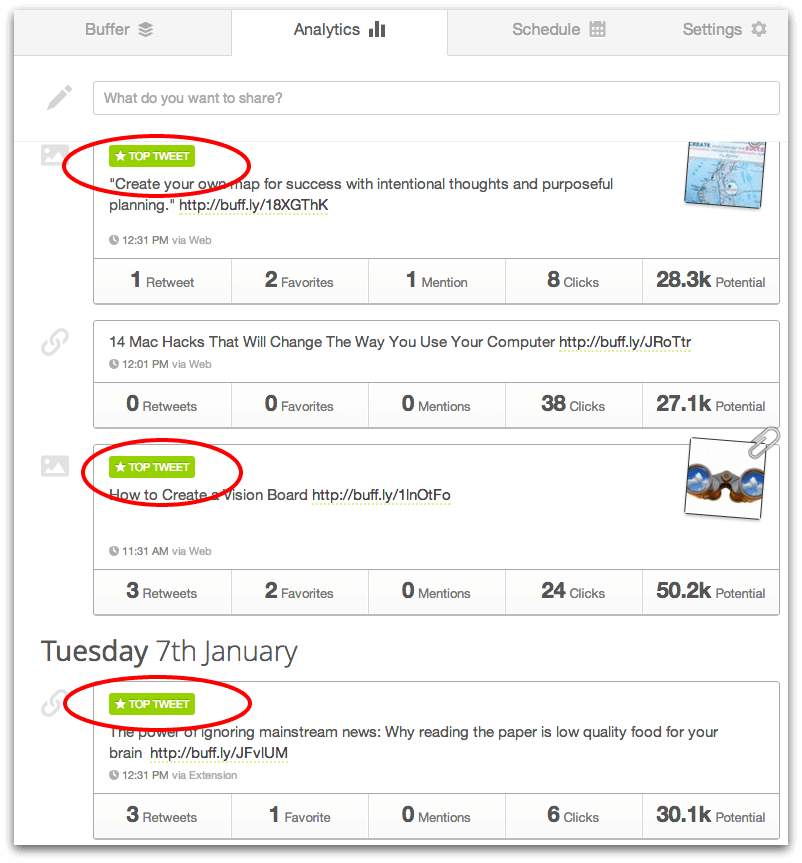
Honestly, I tweet as much as I want and I don’t really have a set amount of tweets per day. I schedule about eight tweets per day into Buffer, I carefully put this group together to have variety and make sure that my Twitter content is focused on things that fit my personal brand like marketing and social media how-to’s. I also like to mix in random things that I think are fun or entertaining. Twitter should be fun, right? I try to respond to tweets two or three times per day and touch base with friends on Twitter. I also share content from tribemates on Triberr so I’ll go in first thing in the day and schedule about five tweets to go out. Resource: What is Triberr? I will repeat certain tweets once or twice to reach certain time zones but I don’t do that with all my tweets. I use Buffer’s analytics that show my top tweets and repeat them.


Question 8— What are the best tools for following conversations?


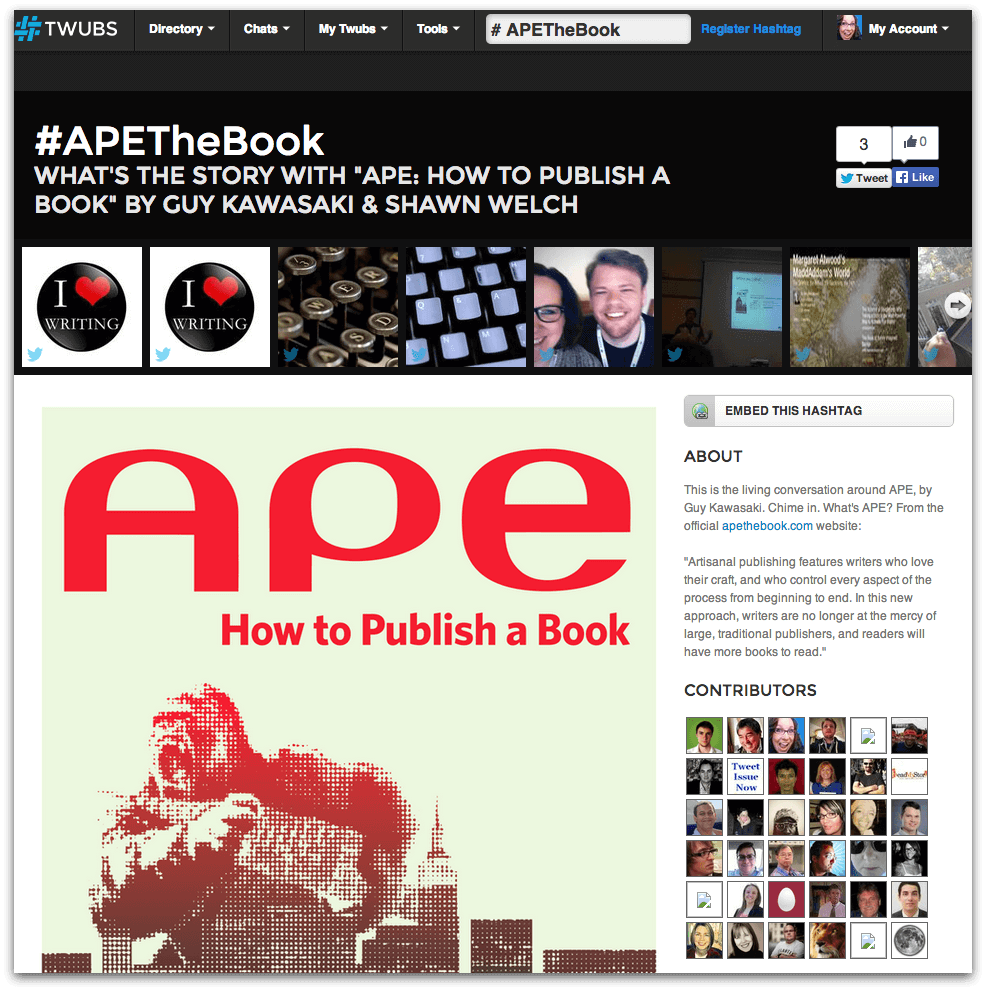
I use TweetDeck for everything including TweetChats. You can also try websites like Twubs to follow certain hashtags. Here is the Twubs page for #APEtheBook.


Question 9— How do you find, curate and share great content?


Answering this would be a whole post on its own! Following the right people on Twitter helps you find great content to share


Following the right people on Twitter helps you find great content to share


. One really easy way is to sign up for an email list that Guy Kawasaki and I started called HASO to “help a socialist out” and make it easy for people to find great stuff to share. We’re sending out a daily digest of great stuff we find. You can sign up here. Guy Kawasaki and I recently were guests on a workshop for Hubspot and shared our best tips for finding great content. This SlideShare provides lots of great information. To find great content, I recommended Pinterest, using Feedly and Goodreads.


8 Places You’re Guaranteed to Find Great Content to Tweet from HubSpot All-in-one Marketing Software


I hope this gives you some ideas to bump up your Twitter activity, become more efficient and give you more time to have fun tweeting. Let me know if you have questions in the comments below. If you liked this article, please sign up to receive my blog by email when I post new content and share to your favorite social networks.

Tuesday, 14 January 2014

5 Social Profile Changes to Drive Traffic to Your Website

5 Social Profile Changes to Drive Traffic to Your Website

0
0

While your main focus on social media should be to connect and engage with your audience, fans, and customers, it doesn’t hurt to give them a few ways to click back through to your website from your social profiles.

Different social networks offer both obvious and not-so-obvious ways to help your fans and followers click through to your website. Here are five social profile changes you can make today to drive traffic to your website from social networks.

Twitter Bio Link

Twitter gives you the ability to add your website link in the website field of your profile. Unfortunately, this field doesn’t show up throughout Twitter. If someone does a search for businesses on Twitter, all they will see is the 160 character profile bio. This is why you need to add a link to your business in your profile bio as well.
Notice how Elite SEO stands out because they have not one, but two links in their 160 profile bio itself. You will probably only need to add one – just make sure it flows in with the rest of your profile description. Think of it as 160 characters to convince people to click on your link.

Facebook Short Description Link

Facebook allows you to add a website link to your business page. No one is going to see it unless they click the About link beneath your profile photo. This is why you need to add it to your Short Description. The number of characters you will have available to you is dependent on the number of custom tabs/boxes you have – pages generally start with a likes and photos box, with the ability to add more using apps from services like NORTH SOCIALAGORAPULSE, and similar companies. When you add your website link to the Short Description, it will show up front and center on your page like this.
This doesn’t work for all pages – some Facebook pages, such as those set up for local businesses, place your local information (pricing, address, phone number, etc.) in this place instead. If your page has the option to use a Short Description, be sure to optimize it with a link.

Facebook Cover Photo Link

The Facebook cover photo on your business page can be used to do more than just make your page stand out. It can be a great way to put another clickable link front and center on your page. In addition to adding your link on the image itself, you can add it to the cover photo description. This way, if people click on your cover photo, they will be able to click through to your website.
HubSpot, for example, makes their cover photo something that intrigues people to want to click on it, leading them to the description with a call to action and link.

Google+ Introduction Link

One of the many changes Google+ made to their profiles and pages last year was moving the links section down to the bottom. This means that if you want people to be able to click through to your website from your About tab, you’ll need to get that link up higher in your Introduction section. You can actually has as many links as you want in the Introduction – the best rule is to get it in as early as possible so people see it sooner.
In addition to adding a link to your Introduction, you can also add it to your cover photo’s description, similarly to how you would with Facebook. This way, if people click your cover photo, they’ll find a link to your website too.

LinkedIn Showcase Pages

It’s hard to get a link at the top of your LinkedIn company page, especially now that the website link is in a section that is pushed beneath your company page’s status updates. If you have products, you can create a showcase page for each of your products. Your showcase pages show up in the right sidebar of your main company page. When people click through to a particular product, they’ll see the link to it right below the cover photo for the page.
Showcase pages are much more impressive than the individual product listings under the products tab of your company page. So if you have a product, be sure to add a showcase page for it today. Just go to your company page, hover over the dropdown next to the edit page, and you’ll see the create a showcase page link. These pages can also be used for services.
What other areas of your social profiles and pages do you add links to increase traffic to your website?

Thursday, 9 January 2014

Infographic: State of Social Business 2013 and Outlook for 2014

This past year has been a busy one for me and Brian Solis on the research front. We’ve published the following:

Report on the six stages of social business evolution
Report on the true state of social business in 2013,
An ebook on seven success factors of social business strategy
An image-rich slide deck complete with all the graphs and charts you need to benchmark where you are compared to other social businesses.


Brian and I recently introduced an infographic that summarizes high level findings across all of our work in 2013 (scroll down to see it below). And the key finding is that while organizers are making significant headway in terms of building out their social efforts, they are far from realizing real business value.


My outook for 2014 is that many more organizations will overcome the stigma of “social” and seek ways to articulate connections with customers and employees into their business. In just the last half of the year, we’ve worked with several organizations that are doing the hard work of connecting their social efforts to business value — it sounds easy to connect the dots but actually building the organization, governance, and process to do this will be most of the focus in 2014.


It isn’t glamorous. It doesn’t have the appeal of new consumer bright shiny objects or excite of a tech IPO. But this is where the real value will be created, real benefits will be built. It’s going to take a lot of hard work, a bit of gut-wrenching leaps of faith as employees and customers are empowered, but hopefully in a year we’ll have seen key numbers like the percent of companies associating social with business value increase from today.


Highlights from the State of Social Business Infographic


Companies are organizing and formalizing social media strategies into social business strategies…
78% of companies have a dedicated social media team. This is up from 67% two years ago.
Social media teams have grown from 11 people in 2010 to almost 16 in 2013.


Social business strategies are spreading across the enterprise…
Social media headcount across the enterprise has more than doubled at the largest companies from 20 in 2010 to 49 in 2012.
According to our research, there are 13 different departments across the enterprise with at least one person dedicated to social media.
The majority of resources are allocated to marketing at 73%, but as you can see, social media covers almost every major function. Now, whether or not social media is organized and integrated, well, we know that it’s not really.


Marketing = 73%

Corporate communications = 66%

Customer support = 40%

Digital = 37%

Social media = 35%

HR = 29%

Product/R&D = 16%

Advertising = 16%

Customer/User experience = 15%

IT = 14%

Legal = 9%


Companies are trying social business to positive business outcomes…
About 50% of companies say social business has improved marketing optimization, customer experience and brand health.
Nearly one in four have actually seen an increase in revenue.


Companies though have a long way to go…
Many social business programs lack a strong foundation.
Only 17% of companies identify their social strategy as mature.
52% of companies say that executives are aligned with the overall social strategy.
Just 26% of companies approach social media holistically (operating against a cross-enterprise level strategy.)


To succeed, build a foundation for social business…
Benchmark you program with Altimeter’s Social Business reports (see below…underneath the infographic).
Document existing challenges and opportunities to address in 2014 and 2015 (we don’t move as fast as we’d like).
Align all social business efforts with business objectives and priorities.

Tuesday, 17 December 2013

How I Increased My Twitter Followers By 30% in 6 Months


How To Increase Your Twitter Followers @stephaniefrasco6 months ago I had 1,238 followers less than I have now. That's a 30% increase!
I'm not telling you this to brag, but rather to help you do the same. In this post, I'm going to share with you exactly what I've done differently and how you can use my same strategy to increase your Twitter followers.
A few things you should know first:
1. I did not buy any followers. 
I am very against the practice of paying for fans. If you want real followers who actually care about you, your message, and your business, then you should earn them -- not buy them.
2. I didn't pay for any advertising to my Twitter handle. 
I did pay $20 for a promoted tweet which was spent in about 5 minutes and brought me a few retweets but no new followers.
3. I didn't follow-unfollow. 
In other words, I didn't follow a bunch of people and unfollow those who didn't follow me back. This is another practice I think is ridiculous and quite selfish.
Yes, folks my strategy is 100% all-natural. It takes time, but once it takes hold you'll be happy that you actually worked for it rather than cutting corners.
How To Increase Your Twitter Followers In 6 Months - by @StephanieFrasco

Here are the 6 things I did to grow my Twitter following by 30% in 6 months:

How To Increase Your Twitter Followers Naturally & Organically

1. Blog On A Regular Basis 
This by far is the most important thing you can do to increase your Twitter followers. By now, you should know that when it comes to blogging, I mean business. And rightfully so, because it is my business. At Convert With Content, we manage social media & blogging for our clients. It is also my business as a marketer to educate clients and potential clients on why blogging for your business is a practice that can increase your social media presence, your authority, your traffic and your leads.
I'm living proof that blogging on a regular basis helps increase your Twitter followers. The reason is simple. When you blog, you have something to share on social networks and you have something for others to share on social networks. If that person has good Twitter etiquette, he or she will attach your name to it. Boom, your Twitter name just got pushed out to a new audience.
2. Tweet On A Regular Schedule 
This is the second most important thing you can do to increase your Twitter followers. Like blogging consistently, Tweeting consistently will keep your name out there, increase the likeliness of getting replied to and retweeted and increase your reach.
Social Media doesn't sleep and neither should your online presence. I automate many of my tweets to keep my profile updated. If you automate right and follow my rules (insert link to automation article) you will see the benefits of your actions. Now don't get me wrong, you can't rely on automation alone. In fact, that's poor practice. But as long as you're sharing valuable content and relevant content this strategy will work.
Because Twitter is a massive search engine, when you tweet about relevant topics to your industry, you will be found by others interested in those topics. People follow keywords and lists on Twitter. Make use of that wisely.
3. Guest Blog 
By creating a presence beyond your own website, you will be introduced to a new network and with that comes new followers. I am a regular contributor to Social Media TodayBusiness.com,StateOfDigital.com and other online publications. Anytime I blog for them, they share my content with my Twitter handle attached to their audience. It works.
If you're looking for opportunities to guest blog, you can find many by typing in "Guest Blog Submissions" or something similar in Google. Another way to approach the subject is to ask blogs that you follow and pitch them on a topic that suits their audience. Like all things in social media, it's about building relationships.  If you are an Entrepreneur, you should check out EFactor, it's a great network to blog on.
One thing I know for sure is if you blog regularly on your own site and you create great content other people will come knocking at your door to have you guest blog for them.
4. Include Your Twitter Handle In Your Email Signature (& Everywhere)
If you email a lot, include your Twitter handle in your email signature, on your website, within your blog, inside your Pinterest account, in your LinkedIn headline and anywhere else that's public. The easier you make it for someone to find your profile, the more followers you'll get.
5. Live Tweet & Participate In Twitter Chats 
If you attend conferences live tweet them. It's a great way to grow your following with a targeted audience and network. Participating in Twitter chats has the same effect. I participate in them at least once a month and each time I gain new connections and start to build new relationships.
To Do List For Growing Your Twitter Followers - by @StephanieFrasco of @ConvertContent

Pretty simple right? You can do it! I'd love to hear what you do to grow your following.

Tuesday, 3 December 2013

How To Create A Successful Social Business

Are you a social business? By this, I mean are you aligning your social strategy to business goals? In a new Altimeter Group Report, “The Evolution of Social Business“, my co-author Brian Solis and I found that this was not the case. Only 34% of businesses we surveyed felt that their social strategy was connected to business outcomes. Brian goes into detail about our findings in this post.
Our research found that organizations typically go through six stages of social business evolution. But this doesn’t mean that you have to wait until Stage 6 to realize business impact. Rather, it’s not only possible but crucial to focus on achieving business results right from the very beginning. The six stages are as follows (for a deeper dive into each, please download the report):
A great example of this from the report comes from Shell. They launched the Shell Facebook presence only in January 2012 and they mostly post content on the page and moderate comments. But they see tremendous benefit from this activity because their business goal is to understand and improve their reputation with customers and partners. They ask the question, “To what extent is Shell meeting customers’ energy needs in socially and environmentally responsible ways?” The key here is that this is not an effort isolated to Facebook — they measure reputation across ALL media channels so that they can see their activities impact reputation differently. Moreover, they measure this DAILY. Shell may be early in their social business journey, but they make sure that they see business impact from their efforts.

Creating Your Social Business Strategy

The focus on business goals is the key to having a coherent social business strategy, which we define as “the set of visions, goals, plans, and resources that align social media initiatives with business objectives”. That alignment and focus on business objectives forms the foundation for the strategy, no matter where the organization is on their evolution. Just 28% of respondents in our survey felt that they had a holistic approach to social media, where lines of business and business functions work together under a common vision. A mere 12% were confident they had a plan that looked beyond the next year. And, perhaps most astonishing, only half of all companies surveyed said that top executives were “informed, engaged and aligned with their companies’ social strategy.”
But there is hope. we found a set of best practices common across all development stages. We call these the Success Factors of a Social Business: 
  1. Define the overall business goal and align social media strategies against it.
  2. Establish the long-term vision for becoming a social business.
  3. Seek and earn key executive support and sponsorship based on the business case, not the trend.
  4. Beyond marketing and service campaigns, develop a list of prioritized initiatives that will demonstrate business value at the enterprise-level and in key functions/lines of business and plot them on a two-to-three year roadmap.
  5. Train and educate executives and employees not just how to use social media, but also how social media can impact business objectives and how to develop and run programs that do so continually.
  6. Get the right people involved at the right levels. An effective social business strategy takes a unified approach with cross-functional support. It’s a combination of social media savvy and business acumen.
  7. Invest in technology only after your vision and strategy are set. Technology and social media in general are only enablers to the overall mission and purpose you set forth.

Applying The Social Business Success Factors

From the research and from our work with clients, we have found that these success factors become especially important when the organization moves from one stage to the next. Some of the most common issues we’ve seen organizations face include:
  • Getting executives to buy into the social strategy — and fund it. Factors #1 and #2 which use business goals and a common vision to align the organization, become crucial. Sometimes this can be accomplished with a short education session, but more often, it requires that social strategy be built into the very fabric of the executive’s work and priorities. This is done only by strongly linking social activities to the 3-5 strategic goals that executives care about. If social doesn’t help the executive accomplish their mission critical goals, then it won’t ever make it on to their radar.
  • Creating a coherent strategy for social business. As crazy as it may sound, we’ve been working with clients to create three year roadmaps for their social business strategy. That’s not a typo, although it may seem impossible to do this in a fast-changing technology landscape. The key is to focus on the long-term strategic business goals of the organization and to make technology decisions ONLY after the vision and strategy are set.
  • Establishing governance. This is the perennial question, “Who owns social media?” This isn’t a simple issue determined by company size, maturity, or industry. It’s base much more on how the organization sees social playing a role in the company in the future, and creating a roadmap to bridge the reality of today to the future. One organization we worked with envisioned a multiple hub-and-spoke model with product and country teams. But to get there, they realized they needed to be temporarily centralized first, move into a basic hub-and-spoke with defined responsibilities, and a migration path for governance to pass into the spokes in a few years after training ensures that the skills and capabilities are in place.
  • Engaging and transforming the organization. This is perhaps the most challenging problem facing senior executives — they see the need to redesign and retool the organization for greater flexibility, adaptation to a changing landscape, and resilience in the face of increased competition. CEOs see social technologies as a way to harness and bring together employees, customers, and partners, but don’t have a roadmap to be able to do this.
By keeping in mind where you are in your social business evolution AND using the success factors, you’ll be able to start tackling some of these tricky issues. We’ve seen firsthand that this is not an easy journey, but it is one that you can successfully navigate. I’d love to hear how your journey is going — what stages are you in and have you encountered similar challenges? If so, how has our organization managed to move forward? Add your comments below or send me an email with details — we’re always looking for more case studies!
If you’d like to learn more about how Altimeter can help your organization move quickly and efficiently through the social business journey, please get in touch with us at sales@altimetergroup.com.

Thursday, 15 August 2013

How to Stand Out on Social Media

One of the main challenges people and organizations encounter in social media is how to stand out in the crowded marketplace. Social media can seem like a hoarse carnival, it gives you an opportunity to meet people, interact with them, and make new friends only if you are willing to undertake new things, and think boldly and creatively about the world around you. You can use the secrets below to stand out in social media.

A. Obey netiquette
There are rules governing the use of any social site, get conversant with them so that you don't encounter problems with other users.

B. Be social
You might think this one could go without saying. Even today though, on occasion, we work with people who don't understand the social nature of interactive media. Early in their exposure to social media, some people think it's just another marketing vehicle, when it is actually an opportunity to be social and connect with people. The first step to standing out in on this sites is to be social, interact with people, and find common things to talk about. Social media is a great opportunity to involve others in creating content. Find others that are interested in your niche and partner with them to produce something complementary to both your efforts.

C. Be concerned in people
One quick and easy way to stand out in social media: be more interested in people than you are in yourself. Find topics that interest other people and get them talking about their interests. Be genuinely interested in others and they will be genuinely interested in you.

D. Share video
This might the most difficult thing on the list: how do I produce content or video people would be interested in that reflects well on my brand? For personal branding, this may not actually be an easy thing to do but it is rewarding. Many people today are visual learners. When you create content or update your social media, don't discount the visual aspects - great photography, well produced video, lots of white space. A majority of your audience will appreciate your design, colors, and photos more than the text on the page. People love video online, producing and sharing high quality and interesting videos is a sure way to stand out in social platforms.

E. Create gripping Content
Content is king in today's social media and creating high quality valuable content is a sure way to generate a big following online. This is a subjective measure that is really key to the audience you're targeting. High quality content for a hotel company is different from an educational institution or a motivational speaker and is completely different from valuable content targeting banking professionals. As you create your content, have your target audience in mind.

F. Share timely, interesting and significant stuffs
The people that amass tens of thousands of followers and fans are ones who produce timely, interesting, and relevant updates. Create a vision for your social media efforts: what do you want your social media to look like a year from now. By creating this vision, you have a clear picture of your mission online.

Following these strategies will help you move from just being a follower of social media trends and bring into being a leader in the social media platform.

Article Source: http://EzineArticles.com/7920580

Thursday, 25 July 2013

YouTube Adds Embeddable Subscribe Buttons


Youtube


For paid channels, the Subscribe button links to the channel pages rather than automatically subscribing users, YouTube noted in a blog entry.

The move is a part of an effort to encourage users to subscribe to more channels.

"We want to help you build your channel's audience where ever your fans are," a YouTube spokesperson told Mashable. "Just like you've been able to embed your videos, now you can embed a one-click subscribe button on your site to make it easy for fans to follow you on YouTube."

The steps to add the new feature are relatively simple. Just enter the name of the channel by clicking here. YouTube then configures a personalized code, which you can copy and paste into any content management system running a website.

Image: AFP/Getty Images

Thursday, 18 July 2013

Google+ Update Makes It Easier to See What Your Friends Like


Googleplus

Google is making it easier for you to discover what your friends like on Google+.
Starting Tuesday the company is going to start highlighting posts that have been +1’d by people in your circles on your stream, as well as highlighting some of your own well-received posts to your friends in their main stream on Google+.

The feature is somewhat similar to the way that posts are currently highlighted on Facebook, in that posts on Google+ will now show who from your circles +1’d the post directly above the actual content.

activity-post-e
Content might not be items that would have otherwise shown up in your main feed. For instance, a friend of a friend’s post might show up in your main feed now because several mutual friends in your circles +1’d the post.

Content will only appear for people who you’ve given permission, however. So, a post you make visible to only people in your circles will still only show up for those individuals, while one you make available publicly might now also be shared to strangers as well.

If you’d rather keep your +1’s private on Google+ you can customize who, if anyone, can see your +1’s highlighted in their stream from the Settings page within Google+.

What do you think of the new feature? Let us know your thoughts in the comments.

Thumbnail courtesy of iStockphoto, Andrea Zanchi Photography; Screenshot Courtesy Vic Gundotra, Google +

Wednesday, 17 July 2013

Twitter’s Updates Sync Direct Messages And Ban Auto Follow Backs

Over the past week, Twitter has made a number of updates to its online service and mobile apps, improving search features and syncing actions across all devices. Twitter has also banned automatic following back from the site. 

Yesterday, Twitter announced that direct messages would now be synced across all devices, so that if a user read a DM on their iPhone, it would be marked as read on their PC or Mac. Syncing will roll out over the next few weeks. Twitter has also improved the People search on phones: some results will show up with a full user bio and, by swiping the preview to the left, searches can also see related accounts. For example, if you search for Wayne Rooney, you might see Rio Ferdinand’s account and the Manchester United account. Additionally, the app will update users with new tweets related to a search as they appear, allowing users to stay up-to-date with the conversation.

A number of improvements have been made to Apple devices. For instance, the connect tab on Macs now includes favorites and retweets, as well as mentions, but users can adjust the preferences if they want to see just mentions. Six new languages have been added to the Mac app: Danish, Filipino, Finnish, Norwegian, Swedish and Thai. Meanwhile, on the iPhone:


[It is] now easier to reply to Tweets with a built-in Tweet composer that appears when you tap to see details. It’s also easier to find accounts to follow with a new people button on the navigation bar, making the iPhone experience consistent with our Android app. Tapping this icon reveals a list of accounts that may be interesting or relevant to you.

Last week, Twitter published some changes to its Developer Rules of the Road and Developer Display Requirements, banning automatic follow backs in the process. Accounts that auto follow back are often guilty of spamming their followers with useless information. Twitter, a site renowned for having one of the largest follow back black markets on the web, is targeting fake accounts and spammers with the changes, which Sylvain Carle announced in the Developer Blog on July 3rd:
For example: we relaxed some display requirements around author’s name, timestamps and permalinks; we clarified that the “no commingling” term doesn’t apply to manually curated streams; and, we now require developers to disclose their privacy policies before people download, install or sign up for a service. We have also clarified some restrictions: hosting datasets of raw Tweets for download is prohibited, and automated following or bulk following is also prohibited. 

We believe these changes will help provide a better experience for everyone using Twitter. Be sure to read the actual documents and use those for final reference.

On the same day as the changes were made to Twitter’s rules and regulations, users began noticing that, as they composed tweets, hashtagged words were getting autocompleted, with a list of suggestions appearing underneath. The hashtags suggested are often trending hashtags, making it easier and quicker for users to join the conversation.

In related news, three university researchers claim that they have come up with a way of working out how often tweets will get retweeted, based on the number of times they have been retweeted in the first 10 minutes after they were published. According to Tauhid Zaman of the MIT Sloan School of Management, Emily Fox of the University of Washington and Eric Bradlow of the University of Pennsylvania, a tweet will have the same number of retweets in those first 10 minutes as it will forever after. So, if a tweet is retweeted 20 times in its first 10 minutes, it will be retweeted 40 times in its lifetime. To see some of their predictions, go to the “Twouija” website.

What do you think of the changes Twitter has made to its service?

Thursday, 27 June 2013

Foursquare Allows Users To Check-In Their Friends

check in a friendFoursquare has just updated its app for mobile devices, adding a friend check-in option, something Foursquare says users have wanted for a while.

Foursquare has been monitoring user activity, noticing that a lot of people, 90% in fact, are using the mention feature to say who they’re with. Foursquare announced the update in a blog post yesterday:

“So, starting today, we’re making it easy for you to save your and your friends’ time – you can now check in your friends when you’re out together. Instead of you and four friends each pulling out your phone to check in at dinner, now one of you can do it for everyone. Less time spent on your phone, more time enjoying the moment.” To check friends in, users just tap the “I’m with…” button then search for and select their friends. If a friend checks you in, you will be sent a notification asking for your permission. You only need to get a friend’s approval once: from them on, every time you check them in somewhere, they’ll have to tap the delete button to get rid of it. If you don’t get a friend’s permission to check them in, they’ll just be mentioned as before.

If you friend checks you in somewhere at the same time as you check yourself in, yours is the only check-in that gets shown, “so you can always get your photo in, or tell everyone what you’re doing”. So, presumably, if two people check each other in at the same place and time, their check-ins will actually only show themselves.

Foursquare introduced the update “so people could spend less time on their phones, and more time having fun” – exactly the opposite of what big social media companies Facebook and Twitter are trying to do.

What do you think of Foursquare’s new friend check-in feature?

Tuesday, 28 May 2013

5 Tips to Design the Best YouTube Channel Page


Youtubethumb


If you create and share your own videos on YouTube, then you've already taken the first step in putting your face out there. But there's another way to put your best face forward: Craft your channel page. Though your channel's landing page might appear simple (and it's grown simpler over the years), there are a number of features you can fine-tune to optimize a viewer's experience. You can't customize like you used to, and there's a lot of white space, but there are very specific ways to make your page stand out. Read on to find out how you can turn curious viewers into devoted subscribers.

Do you have any tips for boosting your YouTube profile? Let us know in the comments.

1. Post a great channel trailer.

 As soon as visitors land on your page, you want to hook them. A channel trailer is a great way to do it. You'll want something brief, attention-grabbing and representative of the kind of content you post. Don't tell people what you do — show them.

As the first piece of content some will see, the trailer is also a good place to plant the seed for subscribing. Get a quick line in there asking viewers to hit "subscribe." But do it subtly.

2. Optimize your channel name and description. 

Remember that your channel name and description won't just appear on your homepage. Your channel will appear in searches and suggested channel categories across YouTube, so make sure it's appealing. Note that your channel name isn't the same as your URL; you can change the former without affecting the latter.

As you write your channel description, it's good to think about how it will appear across the site and around the web. You'll need a description that highlights your most important content right up front.

3. Pick the right icon. 

The key here is to select something that will look good at very small resolutions. It's not like choosing your Facebook or Twitter profile photo; first of all, this is about branding. Your friends don't care that much if your photo is recognizable, or if it's even of you. But in the age of short attention spans, this tiny piece of real estate is your best bet for pulling viewers to your channel page.

4. Make beautiful channel art. 

Again, it's important to consider where your content will be seen other than your channel page. Or in this case, how it will be seen. You'll have viewers on desktops, tablets, laptops, phones, televisions and whatever new format comes out next week. That means you need to optimize your image to look great on every platform.

YouTube recommends the dimensions 2560x1440 px. Check out its image guidelines to see how your art will be cropped across different platforms (who will be seeing what). Here's the full art for Mashable's YouTube channel page. Note that only the illustrated band in the center of the image is visible on desktop.


When you're drafting the art, try to give the viewer something to connect to beyond a brand or a logo. If you want to throw your pretty face in there, do so. YouTube lists GoPro and Epic Meal Time as well-designed channel pages.

5. Maintain your feed. 

As a content creator, you'll want to keep your loyal subscribers entertained. If you don't upload on a weekly schedule, the feed can give you the appearance of being active. A default feed will include your uploads, videos you have liked, videos you added to playlists and channels to which you subscribe. 

You can adjust your sharing settings if you don't want to flood your subscribers with updates. But you can also approach it strategically: You might only want to like certain videos or comment on content on certain days of the week, for instance.

Homepage image courtesy of Flickr, Jo Nakashima

Thursday, 23 May 2013

Exclusive: Pandora Deepens Its Integration With Facebook

Facebook-headphones-istock-composite

Starting Wednesday, the songs and stations you listen to, as well as the tracks you give a "thumbs up," can be shared directly to Facebook. Details about your activity on Pandora, when shared via the social network, is then aggregated and displayed as part of the music section on your Facebook profile.

Pandora already supported sharing individual pieces of content to Facebook and Twitter. The new integration is the product of a year-and-a-half-long conversation between Facebook and Pandora.

“We’ve been talking to Facebook about how best to embrace this idea of what they call Timeline Apps — 'How do you make it really, really easy for people to update their Facebook identity as they consume content around the Internet and on mobile?'” Tom Conrad, Pandora's chief technology officer, told Mashable.

“Our frame in the conversation with them has always been, ‘How do we embrace this technical opportunity in a way that drives real value for both Pandora listeners and for Facebook users?”


Facebook’s recent Timeline update, as well as its music section, compelled Pandora to pursue deeper integration, Conrad added.
Users are now able to seamlessly stream all their activity on Pandora to Facebook through an opt-in program. They can choose to send all data about their Pandora activity, or just a bit of their musical history (e.g. songs you give a "thumbs up"), to the social network.

Shared activity will appear in the Activity Log and the Music section of users' Facebook profiles, as well as on their friends' News Feeds based on Facebook’s algorithm.

“Seeing an ever-updating ticker of what my friends are listening to — what all of my friends are listening to — is less interesting than coming to understand the musical identity of a subset of the people that I interact with on Facebook,” Conrad explained.

Facebook's News Feed algorithm focuses on friends that users regularly interact with. That functionality extends to Pandora’s Facebook integration as well, so they won't suddenly have a News Feed filled with Pandora posts from all their high-school friends. In essence, it's a Facebook-curated feed that is limited only to people that a user is interested in hearing about.

When sharing isn't desired, a prominent toggle button within Pandora allows incognitio listening. This may be enforced, for example, when a user is listening to a holiday-themed radio station, but doesn't want to broadcast those details to their friends.

Intended to enhance the Pandora experience rather than invade privacy, Conrad said the service will be reaching out and educating its users about the new feature, explaining how to opt in, and how to control what data (if any) gets sent to Facebook.

Pandora’s new Facebook integration is live now.

What Pandora activity will you share on Facebook? Let us know in the comments.

Image courtesy of Pandora; Mashable composite: Headphone image via iStockphoto, oonal; Facebook graphic via iStockphoto, pressureUA

Get Hosting for $4.95 a month