
LinkedIn
has redesigned its job search engine to make it easier for job seekers
to find a career suited to their expertise, with a deeper Advanced
Search option and the ability to save jobs for later inspection.
“Here at LinkedIn,” says Vaibhav Goel on the LinkedIn blog, “we want to help you find your dream job and the new LinkedIn Jobs experience has been completely redesigned to connect you with the right career opportunities and tools to help you take advantage of those opportunities.”
The advanced search at the top of the page – which has been redesigned for easier navigation – allows users to narrow down their search by country, industry, zip (post) code, job functions and salary. A “More Options” buttons gives users even more search parameters.

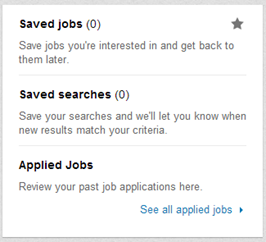
Beneath the search bar is a list of jobs that users may be suited to, taking into account experience and expertise, with sponsored jobs at the top. Hovering over a job with the cursor will reveal a star: by clicking on the star, job seekers can save the job in a tab on the right of the job search.
There is even the option to save previous job searches, so that new jobs that fit the search criteria will show up on the job search page. Job seekers can also opt in to receive email alerts if any jobs fitting their search criteria get posted on LinkedIn.
Perhaps the most interesting new feature is the “Discover jobs in your network” category at the bottom of the page, which displays career opportunities in companies that employ the user’s connections.
 On
the blog, Goel describes the networking category as a “brand new
feature that highlights opportunities at companies where you have an
‘in’ such as a first degree connection who can refer you and help you
get your foot in the door”.
On
the blog, Goel describes the networking category as a “brand new
feature that highlights opportunities at companies where you have an
‘in’ such as a first degree connection who can refer you and help you
get your foot in the door”.
LinkedIn has also introduced two new features specifically for Job Seeker Premium subscribers: an advanced search feature to find salary specific jobs and “embedded tips to help you make the most of LinkedIn for your job search”.
What do you think of LinkedIn’s improved job search engine?
“Here at LinkedIn,” says Vaibhav Goel on the LinkedIn blog, “we want to help you find your dream job and the new LinkedIn Jobs experience has been completely redesigned to connect you with the right career opportunities and tools to help you take advantage of those opportunities.”
The advanced search at the top of the page – which has been redesigned for easier navigation – allows users to narrow down their search by country, industry, zip (post) code, job functions and salary. A “More Options” buttons gives users even more search parameters.

Beneath the search bar is a list of jobs that users may be suited to, taking into account experience and expertise, with sponsored jobs at the top. Hovering over a job with the cursor will reveal a star: by clicking on the star, job seekers can save the job in a tab on the right of the job search.
There is even the option to save previous job searches, so that new jobs that fit the search criteria will show up on the job search page. Job seekers can also opt in to receive email alerts if any jobs fitting their search criteria get posted on LinkedIn.
Perhaps the most interesting new feature is the “Discover jobs in your network” category at the bottom of the page, which displays career opportunities in companies that employ the user’s connections.
 On
the blog, Goel describes the networking category as a “brand new
feature that highlights opportunities at companies where you have an
‘in’ such as a first degree connection who can refer you and help you
get your foot in the door”.
On
the blog, Goel describes the networking category as a “brand new
feature that highlights opportunities at companies where you have an
‘in’ such as a first degree connection who can refer you and help you
get your foot in the door”.LinkedIn has also introduced two new features specifically for Job Seeker Premium subscribers: an advanced search feature to find salary specific jobs and “embedded tips to help you make the most of LinkedIn for your job search”.
What do you think of LinkedIn’s improved job search engine?


