Showing posts with label Social Media Networking. Show all posts

Tuesday, 3 September 2013

What is Social Media? A Guide to Profiting From Social Networking

SM is an umbrella term that encompasses the technologies and the activities that people use to share experiences, ideas and information with each other. The term is still evolving. The term "SOCIAL MEDIA" most often refers to activities that integrate technology, social (or human) interaction, and the construction of words, pictures, videos and audio - better known as "user generated content" [an example of UGC would be videos on YouTube.]
Social media can take many different forms, including Internet forums, weblogs, wikis, podcasts, pictures and video. Technologies include: blogs, picture-sharing, vlogs, wall-postings, email, instant messaging, music-sharing, crowdsourcing (crowd outsourcing), and voice over IP, to name a few.
Examples of social media applications are Google Groups (reference, social networking), Wikipedia (reference), MySpace (social networking), Facebook (social networking), Youmeo (social network aggregation), Last.fm (personal music), YouTube (social networking and video sharing), Second Life (virtual reality), Flickr (photo sharing), Twitter (social networking and microblogging) and other microblogs such as Jaiku and Pownce.
--- What is Social Media Marketing (SMM)?
SMM is where you use social media networking and user-generated content platforms to promote a product, service or content. SMM typically involves creating and participating in a "conversation" with the target audience, rather than blatantly advertising to them.
SMM can also include creating and promoting viral content that is meant to be shared by users. Many marketers are not comfortable with the lack of control over social media but when approached properly, social networks can be extremely effective channels for building product evangelism, reputation management or corporate branding
--- Why is it becoming so popular?
I believe it's simply because it mirrors our true nature. We are gregarious by nature and for once we are able to use technology easily to reach out and connect in new and exciting ways. It's still all so new too, there are new frontiers popping up regularly and it's a bit like the early Internet "gold rush" days during the 90's
--- Is every Social Media site for every entrepreneur?
They might not think so, but it is. You do it naturally every day, SM online is simply the same thing applied technologically.
--- How does a business owner determine which site is the best match for them?
Good question. Not all SM Sites are equal. I typically advise people to think "classical marketing" and don't let the 'flashing lights' fool you. Visit the site, pat attention to the conversation. "Lurk" for a while. Ask a question, see what happens. Each environment has its own rules. Blunder in and start shouting and you'll get flamed. Respect the environments 'sub culture' and you'll do fine. An obvious example of this in action is a site that caters to "gamers" - you instinctively know that if you're selling insurance you would have a tough time in that environment. Like I said, think like a classical marketer.
--- Are there some "best practices" steps to starting and maintaining your SMM sites? And how do I make social networking work for me?
- Social Media Marketing
Many a company has forgotten the old maxim, "Act in haste, repent at your leisure..." The same warning should be applied to companies rushing to get in on the social media marketing wave.
If you hear things at work like "We should have a blog," or "Let's join Facebook," I suggest [respectfully] that maybe you are about to make a whopper of a mistake.
Here's why...
- Backwards is bad
You are starting your social media strategy design backwards - and this will lead to trouble.
In any other business endeavor we start by figuring out what we want to accomplish. Social media technologies are not magical. They're just tools too. It's time to stop doing social media marketing because it's trendy and instead do it because it works!
- 4 Things to Remember
(1) The web is about people. You need to know your audience. Understand their capabilities, their hangouts online, their language and behaviors. If you're targeting business travelers then consider rating and review sites for example. Just don't guess...
(2) Figure out what will be different when you are done. This is the "why" behind your plans. Do you want to create a close knit community or a product testing ground. Understand the motive's behind your actions.
(3) What outcomes and objectives are you seeking to achieve. Consider the end result and how you will measure it. A fuzzy or fluffy end result is almost as bad as not specifying one at all. How will you measure success?
(4) What technology to choose. Only answer this question when you've completed the others because then you'll know with clarity and confidence.
In conclusion, if you recognize classic business planning and management principles amongst these notes you'd be correct. The game may have changed, but the rules are still the same. Plan first, then act with confidence.
--- How long is this new type of marketing going to take to master?
The actual skills are quite simple - you likely already have them mastered. What you need to learn is the PROCESS. That takes a little time, but frankly not that much.
--- What if I don't know many people to invite to my network?
No problem. Answer this question "If you are the ANSWER, what was the QUESTION?" Armed with that answer you can locate groups of people who would need what you offer. You can then invite them to participate and you can SHARE your knowledge and expertise to PROVE you are the answer to their problem. Use your favourite search engine to locate these people - simply type in the QUESTION or problem. Remember, if people knew the answer they wouldn't be looking :)
--- How can I get business through SMM?
It's a funny thing when I'm asked this. We do it daily, so I marvel at the fact people think it's different online. Sure there's a layer of technology in the mix, but it's still about people getting to know people. Remember the old maxim, people buy from people they like and trust.
SMM simply enables (or should I say empowers) you to do this more effectively.
--- Why Most Brands Fail on Social Networks
A new report from JupiterResearch sheds light on what many online marketers suspected for quite some time. Most brands are failing to make impact on social networks...
Naughton's Law states: "We invariably over-estimate the short-term implications of new communications technologies, and we grievously underestimate their long term impacts." Every brand should be online in the best way, know its consumers, and maximize the benefit of its online offering to those consumers.
Here are some startling facts from the report:
- Startling Facts:
(*) The average branded social networking page has only 6,494 friends.
(*) Many advertisers are still building branded social networking pages that broadcast content rather than inviting users to interact.
(*) "Most advertisers simply don't know how to market properly within social networks." - JupiterResearch
- New Research Suggests:
(*) You should promote your SM pages with paid adverts rather than relying on viral marketing to get the message out. Building viral buzz is harder than you think.
(*) You need to engage users on the page. Even simple forms of engagement, such as contests, on average doubled the number of friends acquired by each branded page.
(*) You must also appeal to social networkers' love of multimedia to get noticed. Social Networkers are twice as likely to visit a branded page focused on media content than a branded page focused on products.
--- How does the non-writer do this type of marketing?
It really shouldn't pose a problem. The 'Net is vast and there's room for each of us to be AUTHENTIC. Even behind the shield of a computer many of us seem able to sense a scoundrel or someone "putting on airs".
If you can email you can do SM. If you can talk you can SM. If you have a pulse... you get the idea.
--- Do the Social Media Marketing sites have fees to pay?
Typically NO. I advise you to initially avoid any sites that ask for payment until you know precisely what you are paying for. There are some good fee based sites out there, but the good ones also offer a free version too - start there if you wish. Let the results determine the level of investment you are prepared to make.
--- Are there some sites that you would recommend for business people?
LinkedIn.com
eCademy.com
SelfGrowth.com
Ning.com - 'create your own' Social Media website.
--- Will I have to spend hours a day keeping in touch with all of the people who write to me?
You will need to invest time and energy in your online marketing. Whether it's YOU that does this or one of your staff is entirely up to you. But you cannot expect a "set and forget" solution to something that is inherently human.
--- How can I protect myself from "weirdoes?"
Be careful. Don't give away sensitive or private information online. You will always be exposed to some degree to odd people. I get some very odd emails and propositions, however you need to remember this is business, and although you are using "personal skills" to network online, never forget that.
--- How can I come across as a professional on these sites, and is it possible to do "real" business this way?
Yes. Publish a professional PROFILE. Show you are a professional and act accordingly and you will be perceived as such. Include family photos of you dressed as a clown at your kids birthday party at your own peril. Remember, online your "goofs" are eternal and will haunt you forever. Online reputation is area you need to tread carefully within. It's a bit off topic, but that's why I tell teenagers that they should be very careful about the pictures and posts they put on these social websites. Because in a few years the recruiters will be Googling them and this will be part of their "resume" and frankly it can be a career killer before it even starts.
--- Why do some people seem to get good results and others just get discouraged?
As with all things in life some people quit too early. Social Media Marketing and Social Networking takes time. It's like any relationship you develop with another human, rushing to the finish just gets you slapped... Metaphorically and literally too!
Also, success online isn't about one big thing, it's about a cluster of little things done consistently with focus and commitment. The strongest trees take the longest to grow. Online things happen a lot faster, but still there is a time commitment, think 6 to 12 months and you'll be thinking along the right lines.
--- Is there a "fast start" strategy once I sign up for a Social media marketing site?
There is. Create a professional profile. Publish some content establishing you as an expert in your field. The 'readers' will approve and so will the search engines. Explore the active or "hot zones" within the SM site, pay attention to the type of communication and then dive in. Give first. Build kudos and credit before you try asking for anything.
To keep up, use technology to "feed" your SM presence from your other sites like your blog or website. I use technology to syndicate and publish my content to all my SM sites with the push of one button. It makes connecting and staying up to date a breeze.
Remember to invite your friends to join you. Add a promotional button on your "other" sites - for instance if you decide to join Twitter, you can put a "Follow Me" link on your website. Connect, Communicate and Commit. Now 'rinse and repeat.'
--- Extra Topics...
- The 16 Rules of Social Media Optimization
Social Media Optimization (SMO) is a set of methods for generating publicity through social media, online communities and community websites. Methods of SMO include adding RSS feeds, adding a Digg or Share This button, blogging and incorporating third party community functionalities like Flickr photo slides and galleries or YouTube videos. Social media optimization is a form of search engine marketing (SEO.)
Social media optimization is in many ways connected as a technique to viral marketing where word of mouth is created not through friends or family but through the use of networking in social bookmarking, video and photo sharing websites. In a similar way the engagement with blogs achieves the same by sharing content through the use of RSS in the blogsphere and special blog search engines such as Technorati.
Rohit Bhargava was credited with inventing the term SMO. His original five rules for conducting Social Media Optimization have grown to 16 (as of today.) For reference, here is an aggregated list so far:
1. Increase your linkability
2. Make tagging and bookmarking easy
3. Reward inbound links
4. Help your content travel
5. Encourage the mashup
6. Be a User Resource, even if it doesn't help you
7. Reward helpful and valuable users
8. Participate
9. Know how to target your audience
10. Create content
11. Be real
12. Don't forget your roots, be humble
13. Don't be afraid to try new things, stay fresh
14. Develop a SMO strategy
15. Choose your SMO tactics wisely
16. Make SMO part of your process and best practices
Much of what is listed here is common sense, some say it just Web2.0 marketing. Whatever you may think it's definitely good advice no matter what. I'm just pleased we are taking the subject seriously now and promoting strategic content creation as an important aspect in the mix.
- 15 Social Media Facts That You Should Know
(1) Approx. 3 out 4 people in North America use the web
(2) Women are a growth area online.
(3) 44% of the Internet users are between the age of 35 and 54.
(4) Approx. 3 out of 4 people in North America use social networks.
(5) They spend an average of 6 hrs a month on these social networks and view more than 800 web pages.
(6) 51% of social network users are female - they also consume about 200 pages more than men and spend an extra 2 hours online.
(7) Canada is a Facebook nation, the USA is a MySpace nation.
(8) 65.7% of Canadians use Facebook each month spending an average of 350 minutes and consuming 725 pages of content.
(9) 35+ is the biggest age growth sector on Facebook.
(10) Online video and multimedia has grown over 300% in North America.
(11) The average length of a video online is 3.4 minutes
(12) 89% of all Internet users have watched a video in the past month.
(13) 57% of all videos are consumed on YouTube.
(14) Blogs reach more than 60% of all (online) people in North America. Blogging is growing at almost twice the rate of the Internet.
(15) Social networking and multimedia has a reach of more than 80% of the North American population.
Bottom line, if you are not engaged in social media conversations with your marketplace, then you face a very uncertain future. As I'm fond of saying "Be Found, Be Noticed or Be History!"

Thursday, 15 August 2013

How to Stand Out on Social Media

One of the main challenges people and organizations encounter in social media is how to stand out in the crowded marketplace. Social media can seem like a hoarse carnival, it gives you an opportunity to meet people, interact with them, and make new friends only if you are willing to undertake new things, and think boldly and creatively about the world around you. You can use the secrets below to stand out in social media.

A. Obey netiquette
There are rules governing the use of any social site, get conversant with them so that you don't encounter problems with other users.

B. Be social
You might think this one could go without saying. Even today though, on occasion, we work with people who don't understand the social nature of interactive media. Early in their exposure to social media, some people think it's just another marketing vehicle, when it is actually an opportunity to be social and connect with people. The first step to standing out in on this sites is to be social, interact with people, and find common things to talk about. Social media is a great opportunity to involve others in creating content. Find others that are interested in your niche and partner with them to produce something complementary to both your efforts.

C. Be concerned in people
One quick and easy way to stand out in social media: be more interested in people than you are in yourself. Find topics that interest other people and get them talking about their interests. Be genuinely interested in others and they will be genuinely interested in you.

D. Share video
This might the most difficult thing on the list: how do I produce content or video people would be interested in that reflects well on my brand? For personal branding, this may not actually be an easy thing to do but it is rewarding. Many people today are visual learners. When you create content or update your social media, don't discount the visual aspects - great photography, well produced video, lots of white space. A majority of your audience will appreciate your design, colors, and photos more than the text on the page. People love video online, producing and sharing high quality and interesting videos is a sure way to stand out in social platforms.

E. Create gripping Content
Content is king in today's social media and creating high quality valuable content is a sure way to generate a big following online. This is a subjective measure that is really key to the audience you're targeting. High quality content for a hotel company is different from an educational institution or a motivational speaker and is completely different from valuable content targeting banking professionals. As you create your content, have your target audience in mind.

F. Share timely, interesting and significant stuffs
The people that amass tens of thousands of followers and fans are ones who produce timely, interesting, and relevant updates. Create a vision for your social media efforts: what do you want your social media to look like a year from now. By creating this vision, you have a clear picture of your mission online.

Following these strategies will help you move from just being a follower of social media trends and bring into being a leader in the social media platform.

Article Source: http://EzineArticles.com/7920580

Thursday, 18 July 2013

Google+ Update Makes It Easier to See What Your Friends Like


Googleplus

Google is making it easier for you to discover what your friends like on Google+.
Starting Tuesday the company is going to start highlighting posts that have been +1’d by people in your circles on your stream, as well as highlighting some of your own well-received posts to your friends in their main stream on Google+.

The feature is somewhat similar to the way that posts are currently highlighted on Facebook, in that posts on Google+ will now show who from your circles +1’d the post directly above the actual content.

activity-post-e
Content might not be items that would have otherwise shown up in your main feed. For instance, a friend of a friend’s post might show up in your main feed now because several mutual friends in your circles +1’d the post.

Content will only appear for people who you’ve given permission, however. So, a post you make visible to only people in your circles will still only show up for those individuals, while one you make available publicly might now also be shared to strangers as well.

If you’d rather keep your +1’s private on Google+ you can customize who, if anyone, can see your +1’s highlighted in their stream from the Settings page within Google+.

What do you think of the new feature? Let us know your thoughts in the comments.

Thumbnail courtesy of iStockphoto, Andrea Zanchi Photography; Screenshot Courtesy Vic Gundotra, Google +

Wednesday, 17 July 2013

Twitter’s Updates Sync Direct Messages And Ban Auto Follow Backs

Over the past week, Twitter has made a number of updates to its online service and mobile apps, improving search features and syncing actions across all devices. Twitter has also banned automatic following back from the site. 

Yesterday, Twitter announced that direct messages would now be synced across all devices, so that if a user read a DM on their iPhone, it would be marked as read on their PC or Mac. Syncing will roll out over the next few weeks. Twitter has also improved the People search on phones: some results will show up with a full user bio and, by swiping the preview to the left, searches can also see related accounts. For example, if you search for Wayne Rooney, you might see Rio Ferdinand’s account and the Manchester United account. Additionally, the app will update users with new tweets related to a search as they appear, allowing users to stay up-to-date with the conversation.

A number of improvements have been made to Apple devices. For instance, the connect tab on Macs now includes favorites and retweets, as well as mentions, but users can adjust the preferences if they want to see just mentions. Six new languages have been added to the Mac app: Danish, Filipino, Finnish, Norwegian, Swedish and Thai. Meanwhile, on the iPhone:


[It is] now easier to reply to Tweets with a built-in Tweet composer that appears when you tap to see details. It’s also easier to find accounts to follow with a new people button on the navigation bar, making the iPhone experience consistent with our Android app. Tapping this icon reveals a list of accounts that may be interesting or relevant to you.

Last week, Twitter published some changes to its Developer Rules of the Road and Developer Display Requirements, banning automatic follow backs in the process. Accounts that auto follow back are often guilty of spamming their followers with useless information. Twitter, a site renowned for having one of the largest follow back black markets on the web, is targeting fake accounts and spammers with the changes, which Sylvain Carle announced in the Developer Blog on July 3rd:
For example: we relaxed some display requirements around author’s name, timestamps and permalinks; we clarified that the “no commingling” term doesn’t apply to manually curated streams; and, we now require developers to disclose their privacy policies before people download, install or sign up for a service. We have also clarified some restrictions: hosting datasets of raw Tweets for download is prohibited, and automated following or bulk following is also prohibited. 

We believe these changes will help provide a better experience for everyone using Twitter. Be sure to read the actual documents and use those for final reference.

On the same day as the changes were made to Twitter’s rules and regulations, users began noticing that, as they composed tweets, hashtagged words were getting autocompleted, with a list of suggestions appearing underneath. The hashtags suggested are often trending hashtags, making it easier and quicker for users to join the conversation.

In related news, three university researchers claim that they have come up with a way of working out how often tweets will get retweeted, based on the number of times they have been retweeted in the first 10 minutes after they were published. According to Tauhid Zaman of the MIT Sloan School of Management, Emily Fox of the University of Washington and Eric Bradlow of the University of Pennsylvania, a tweet will have the same number of retweets in those first 10 minutes as it will forever after. So, if a tweet is retweeted 20 times in its first 10 minutes, it will be retweeted 40 times in its lifetime. To see some of their predictions, go to the “Twouija” website.

What do you think of the changes Twitter has made to its service?

Thursday, 27 June 2013

Foursquare Allows Users To Check-In Their Friends

check in a friendFoursquare has just updated its app for mobile devices, adding a friend check-in option, something Foursquare says users have wanted for a while.

Foursquare has been monitoring user activity, noticing that a lot of people, 90% in fact, are using the mention feature to say who they’re with. Foursquare announced the update in a blog post yesterday:

“So, starting today, we’re making it easy for you to save your and your friends’ time – you can now check in your friends when you’re out together. Instead of you and four friends each pulling out your phone to check in at dinner, now one of you can do it for everyone. Less time spent on your phone, more time enjoying the moment.” To check friends in, users just tap the “I’m with…” button then search for and select their friends. If a friend checks you in, you will be sent a notification asking for your permission. You only need to get a friend’s approval once: from them on, every time you check them in somewhere, they’ll have to tap the delete button to get rid of it. If you don’t get a friend’s permission to check them in, they’ll just be mentioned as before.

If you friend checks you in somewhere at the same time as you check yourself in, yours is the only check-in that gets shown, “so you can always get your photo in, or tell everyone what you’re doing”. So, presumably, if two people check each other in at the same place and time, their check-ins will actually only show themselves.

Foursquare introduced the update “so people could spend less time on their phones, and more time having fun” – exactly the opposite of what big social media companies Facebook and Twitter are trying to do.

What do you think of Foursquare’s new friend check-in feature?

Thursday, 23 May 2013

Exclusive: Pandora Deepens Its Integration With Facebook

Facebook-headphones-istock-composite

Starting Wednesday, the songs and stations you listen to, as well as the tracks you give a "thumbs up," can be shared directly to Facebook. Details about your activity on Pandora, when shared via the social network, is then aggregated and displayed as part of the music section on your Facebook profile.

Pandora already supported sharing individual pieces of content to Facebook and Twitter. The new integration is the product of a year-and-a-half-long conversation between Facebook and Pandora.

“We’ve been talking to Facebook about how best to embrace this idea of what they call Timeline Apps — 'How do you make it really, really easy for people to update their Facebook identity as they consume content around the Internet and on mobile?'” Tom Conrad, Pandora's chief technology officer, told Mashable.

“Our frame in the conversation with them has always been, ‘How do we embrace this technical opportunity in a way that drives real value for both Pandora listeners and for Facebook users?”


Facebook’s recent Timeline update, as well as its music section, compelled Pandora to pursue deeper integration, Conrad added.
Users are now able to seamlessly stream all their activity on Pandora to Facebook through an opt-in program. They can choose to send all data about their Pandora activity, or just a bit of their musical history (e.g. songs you give a "thumbs up"), to the social network.

Shared activity will appear in the Activity Log and the Music section of users' Facebook profiles, as well as on their friends' News Feeds based on Facebook’s algorithm.

“Seeing an ever-updating ticker of what my friends are listening to — what all of my friends are listening to — is less interesting than coming to understand the musical identity of a subset of the people that I interact with on Facebook,” Conrad explained.

Facebook's News Feed algorithm focuses on friends that users regularly interact with. That functionality extends to Pandora’s Facebook integration as well, so they won't suddenly have a News Feed filled with Pandora posts from all their high-school friends. In essence, it's a Facebook-curated feed that is limited only to people that a user is interested in hearing about.

When sharing isn't desired, a prominent toggle button within Pandora allows incognitio listening. This may be enforced, for example, when a user is listening to a holiday-themed radio station, but doesn't want to broadcast those details to their friends.

Intended to enhance the Pandora experience rather than invade privacy, Conrad said the service will be reaching out and educating its users about the new feature, explaining how to opt in, and how to control what data (if any) gets sent to Facebook.

Pandora’s new Facebook integration is live now.

What Pandora activity will you share on Facebook? Let us know in the comments.

Image courtesy of Pandora; Mashable composite: Headphone image via iStockphoto, oonal; Facebook graphic via iStockphoto, pressureUA

Tuesday, 7 May 2013

Instagram Introduces Photo Tagging


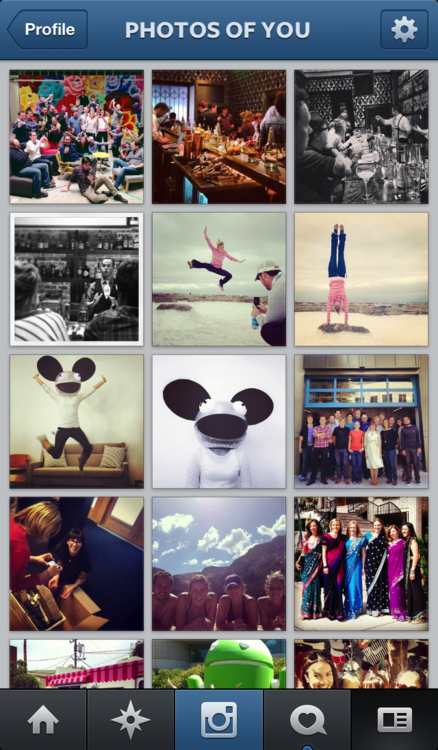
Instagram is rolling out an update which allows iOS and Android users to tag their friends, themselves, celebrities or brands in their photos – a similar feature to that which helped popularise Facebook in its early days. Previously, users had to ‘@’ mention their friend’s in the comments section accompanying photos if they wanted to tag them.

When a user is tagged in a photo they will receive a notification and the photo will appear in the “Photos of You” section of their profile. Like Facebook, users can detag themselves and change the settings so that photos require approval before they appear on their profile.

Having uploaded a photo, users will be given the option to tag people or brands by tapping on them. There is also the option to tag old photos. To see who’s tagged in any photo in their feed users just have to tap the photo, otherwise the tags remain invisible. Only the user who uploaded the photo can tag it, confirmed Instagram in their announcement post:

Today, we’re excited to introduce Photos of You and bring you a new way to share and discover stories on Instagram. When you upload a photo to Instagram, you’re now able to add people as easily as you add hashtags. Only you can add people to your photos, so you have control over the images you share. And it doesn’t stop at people—you can add any account on Instagram, whether it’s your best friend, favorite coffee shop or even that adorable dog you follow.
The benefits of the new tagging feature are obvious: users will be able to collate photo albums of themselves and flick through those of their friends. More importantly, it will be easier to capture and organise special moments with friends, making the photos simpler to rediscover in the future. Brands will also greatly benefit from the photos, as the public will be creating hundreds of great images featuring their logos and products which could then be used for promotional material.

Problems could arise for brands and celebrities, however, as every single photo they are tagged in will appear on their page or, if they select the image pre-approval option, they will have to sift through dozens of images, requiring time and effort. Also, there could be people taking photos which contain negative or inappropriate themes within them. Of course, companies could use this to their advantage, using positive and negative photos for sentiment analysis.

An Instagram spokesperson told TechCrunch that “a year of work went into building the new tagging and Photos Of You section”. The Photos Of You section won’t be published until May 16th, giving users enough time to get to grips with the new tagging feature, as well as to decide what tagged photos of themselves they want to be visible to the public. According to the same spokesperson, Instagram has not thought much about how to monetise the tagging feature yet. However, tagging will undoubtedly increase Instagram’s active user figures, as people will want to see photos that they are tagged in after receiving a notification.

What do you think of Instagram’s new tagging service?

Tuesday, 30 April 2013

13 Million Facebook Users Haven't Touched Their Privacy Settings


Fbookprivacy


As Facebook prepares Graph Search for wide release, some have concerns about the privacy issues the new feature raises.

How can you be sure only your friends will see your name during searches? After all, more than a quarter of Facebook users share information with an audience much wider than their social circle. And 13 million users haven't even touched their privacy settings.


To see how Graph Search will affect you, as well as a few helpful tips for customizing your privacy settings, check out this infographic, courtesy of Marketo.

Are you worried about Graph Search invading your privacy? Tell us about it in the comments.


Homepage image courtesy of Flickr, D. Stenvers

Thursday, 18 April 2013

Facebook Tests Links With Larger Photos, Adds Groups To Timeline

large-image-link-post
Facebook is testing two types of new link in the news feed, one with larger photos and another with icons denoting the link source. The social media giant has also given groups their own separate box on the newly designed timeline.

The new design for posts containing links takes full advantage of the recent news feed redesign, which focuses on providing the user with better, more image-focused content. The first new link being tested is dominated by a picture from the article, which takes up the entire width of the news feed at the cost of a title and summary. Instead, the links source and a sentence from the article sit above the image. Clicking on the photograph takes you to the article – before, it opened the image in a larger lightbox.

The second new link being tested is similar to the current style, with an image on the right and a headline and description on the left. However, the test contains the emblem and the name of the source site across the bottom of the link. Both of the links being tested take full advantage of the redesign’s wider news feed. It is as yet unclear whether the links can contain videos instead of pictures or not, but considering the fact that clicking the photo takes users to the article, it is unlikely – users want videos to play when they are clicked.

It’s been a busy few days for the Facebook team, as they have also added a new groups section to the redesigned news feed. Only open groups that the user has accepted an invite to will appear in the box, closed or secret groups and groups with an invitation pending will not be shown.

Which of the tests do you prefer?

Tuesday, 16 April 2013

71% of Facebook Users Engage in 'Self-Censorship'


Facebook-sunglasses

Most Americans now know the feeling of typing something into a social media input box, thinking again, and deciding against posting whatever it was. But while it certainly seemed like a widespread phenomenon, no one had actually quantified the extent of this "self-censorship."

But now, new research based on a sample of 3.9 million Facebook reveals precisely how widespread this activity is. Carnegie Mellon PhD student Sauvik Das and Facebook's Adam Kramer measured how many people typed more than five characters into Facebook content-input boxes, but then did not post them.
They term this "last-minute self-censorship." The research was posted to Das' website and will presented at the Association for the Advancement of Artificial Intelligence's conference on Weblogs and Social Media in July.

The numbers are impressively large. Fully one-third of all Facebook posts were self-censored, according to the method Das and Kramer devised, though they warn they probably captured a substantial number of false positives. Seventy one percent of all the users surveyed engaged in some self-censorship either on new posts or in comments, and the median self-censorer did so multiple times.

Perhaps the most interesting part of the study was the demographic correlations with self-censorship. Men self-censored more often, particularly if they had large numbers of male friends. Interestingly, people with more diverse friend groups — measured by age, political affiliation, and gender — were less likely to self-censor.
While the researchers declined to speculate in this study about why people may or may not have self-censored, earlier research with a small group of users found five reasons people chose not share what they'd written: aversion to sparking an argument or other discussion, concern their post would offend or hurt someone, felt their post was boring or repetitive, decided the content undermined their desired self-presentation or were just unable to post due to a technological or other constraint.

For Facebook users, the main takeaway here is probably: Feel free not to share. Facebook, on the other hand, has to have a more complex relationship to this research. Their interaction and business models depend on sharing, but it's not hard to imagine some circumstances in which it would be better not to share: racist content, say.

Das and Kramer say future research should address when the non-sharing is "adaptive," (which I think means good, in this context) and when, in the words of Das and Kramer, "users and their audience could fail to achieve potential social value from not sharing certain content, and the [social-network service] loses value from the lack of content generation."

Image via Manjunath Kiran/AFP/GettyImages

Thursday, 11 April 2013

Hands On With the New Foursquare


Foursquarethumb


Foursquare launched a major update to its iOS app Wednesday, now with more focus on what’s around you rather than who.

While the app is certainly all about checking in — and has a new larger check-in button front and center on the app’s home screen — it’s also about helping you find things to do around you. Whether you’re looking for a place to grab a cup of coffee, or trying to find out what club in town is the most popular, there’s a little something for everyone.

Using Foursquare religiously since its launch in 2009, I took version 6.0 out for a spin this afternoon to see just what the hype’s about.

Ready to Explore


When you launch Foursquare, you’re taken directly to an Explore page, where you can see at a glance which of your friends are located around you, what’s happening in the area, and what new businesses might have popped up since you've last been around.

All of that information is contained in a small widget at the top of the screen — you can scroll down to see friends worldwide — with a map behind it. Want to see what’s going on in map view? Tapping on the small map at the top of the page will bring up a full-screen version.

Friends are represented on the map with their profile pictures. Other places on the map, such as restaurants and bars, and noted by familiar location-specific icons — for instance, a bar has a picture of a martini glass. Tap on an icon and you can see that particular location’s rating, as well as its business type. Tap again and you're on that location's Foursquare page with photos, check-in info, tips and more at your fingertips.

Getting Specific


At the top of the Explore page is a search box where you find something like a slice of pizza near you. Those results are then shown on a page similar to that initial launch page, with a list view of establishments meeting your search criteria below a map view of the same information. Once again, tapping on the small map will bring up a larger full-screen view.

In the case of search, however, that map information is more detailed, offering you not only the name and rating of a location, but also highlighting particular establishments where your friends have visited or left tips.
My search for pizza places immediately highlighted a nearby location where my friend Taylor had left a tip, and tapping around, I was able to find several more locations nearby that were frequented by my friends.
The whole experience is pretty snappy, and makes it easy to find a location near you that you know you'll enjoy, primarily because your friends are essentially recommending it to you on the fly.

Tuesday, 2 April 2013

Social Media Marketing Basics


What is Social Media Marketing?
Social Media Marketing, or SMM, is the practice of using social networking websites to promote products, services, and brand awareness.
Who uses Social Media Marketing?
Businesses that want to expand their online customer base use Social Media Marketing.
Why use Social Media Marketing?
Search Engine Marketing (SEM), which uses Search Engine Optimization (SEO), attracts the attention of Internet search engines. People who don't know about your business can find it. Facebook, Twitter and YouTube (SMM) attracts the attention of human beings. People who know about your business will tell other people about it. And those people will tell other people. SMM is the Internet's version of word-of-mouth marketing and the Internet is huge. Use SMM well and potential customers will reach out to you before they use a search engine.
How to use Social Media Marketing
SMM is an investment. It is based on building relationships with potential customers. Plan and budget your company's social networking activities. Identify measurable goals. Do you want to drive traffic to your website? Do you want to address customer complaints quickly and efficiently? Choose one goal and focus your efforts. Add new goals later.
Where to use Social Media Marketing
SMM can be time-consuming. Identify your target market. Be specific. Do research. Where do large groups of these people meet on the Internet? Are they in a hurry? Do they like photos? Are they professionals? Use the social networking websites where your potential customers gather.
When to use Facebook, Twitter and YouTube Marketing
Use SMM consistently. Schedule updates as much as possible. People want to know when they can hear from you. Company blog posts, on sites such as WordPress, can be made once a day, once a week, or once a month. Maintenance is key. If you stop updating, people with assume you don't care.
Only reach out when you have something valuable to offer. Do not add clutter to customer timelines and feeds. You will lose followers. "Something valuable" does not mean a well-priced product. Social networking is about engagement. Ask questions. Give advice. Be clever. Then offer your well-priced product.
Social Media Marketing Tips
Be human. Social networking is people talking to people. Facebook, Twitter and Youtube Marketing relies on social networking. Your business needs to care about the people it networks with. It also needs to show that it cares.
Experiment. Track your results (if possible). Social Media Marketing is not an exact science. Learn how much overt advertising your target audience can accept as part of your SMM campaign. What works for your competitor may not work for you.
Evaluate. Reevaluate. Then adapt. The Internet is always changing. If an SMM strategy is no longer working for you, try something new.

Tuesday, 26 March 2013

Facebook Finally Adds 'Reply' Option to Comments


Facebook-comments

Facebook announced on Monday it is rolling out a new feature so users can reply directly to comments left on their page. Finally.
Followings months of testing, the social network aims to make navigating through conversation threads easier with the new Replies feature. This means that, instead of having to leave a response to a friend's comment way after new ones have been added, you will be able to address each individual comment. Responses will be posted under the original comment too. 

Facebook Replies

The site is also prioritizing comments based on engagement — the most active and popular ones will surface to the top of your posts. This will be especially helpful for pages with thousands of followers.

"You and your readers will have the ability to reply directly to comments left on your Page content and start conversation threads, which will make it easier for you to interact directly with individual readers and keep relevant conversations connected," said Vadim Lavrusik, Facebook's journalism program manager, in an official blog post. "Also, the most active and engaging conversations among your readers will be surfaced at the top of your posts ensuring that people who visit your Page will see the best conversations."

Facebook Replies


For now, threaded replies will be automatically applied to profiles with more than 10,000 followers and opt in for brand Pages until July 10, 2013. To opt in, visit the Replies option through the Page admin panel.

"At launch, this feature will only be available on desktop and we plan to make it available in the Graph API and mobile in the future," Lavrusik added.

Mashable composite, Images via iStockphoto, crossroadscreative, and logo courtesy of Facebook

Thursday, 21 March 2013

YouTube Now Has One Billion Monthly Users


Youtube

We all know YouTube is the biggest video sharing site around, but how big is it, exactly, when compared to sites such as Facebook or Twitter? Here's a hint: YouTube has just hit one billion monthly unique users.
For comparison, Facebook hit that milestone in October 2012. It took the social network eight years to reach one billion active users — almost the exact amount of time as YouTube, which was founded in February 2005. Twitter, which has been around since March 2006, has more than 200 million monthly active users.

The YouTube team gives us a few more comparisons for good measure: "Nearly one out of every two people on the Internet visits YouTube. Our monthly viewership is the equivalent of roughly ten Super Bowl audiences. If YouTube were a country, we’d be the third largest in the world after China and India," says YouTube on its official blog.

YouTube also gives a more detailed insight on what's powering this growth in another blog post about Generation C and mobile devices. According to YouTube, Generation C (or Gen C) is a generation that has grown up consuming content "where and when they want". They watch YouTube on all screens; they constantly switch between devices, they're deeply engaged with online video and they thrive on community. Finally, they're curators — they care about finding content that's important to them.

Gen C, which YouTube considers to be its core audience, now watch just as much YouTube content on smartphones as they do on PCs, and 67% of Gen C watch YouTube on two devices or more, compared to 53% of the general population.

With the rise of smartphones, which have become the dominant force in the mobile phone industry in the last couple of years and show no signs of slowing down, YouTube needn't worry about maintaining this growth for at least another couple of years.

Image credit: YouTube

Thursday, 7 March 2013

Tumblr Expecting To Be Profitable In 2013 After Introducing Mobile Advertising

image
The Vice President of Tumblr, Derek Gottfried, has announced that the popular microblogging site is expecting to make its first annual profit this year, after extending its web advertising model to mobile devices.

Tumblr currently hosts almost 100 million different blogs, both professional and personal, and registers around 15 billion impressions every month, according to statistics corporation Quantcast. Although currently not as popular as its web equivalent, Tumblr’s mobile app is closing the gap, having quadrupled its membership in the last six months.

Gottfried, who has previously expressed his disdain for traditional web advertising, has implemented a different advertising system on Tumblr: companies can pay Tumblr to promote their blogs and blog posts to wider audiences, but it is up to them to make the content original and interesting. The better the content, the more likely it will be that other Tumblr users repost adverts on their own blog or heart it (similar to a Facebook “Like”): the more users interact with the advertising, the wider it will spread.

Advertisers are not able to purchase ad space or use keywords on Tumblr, but the promoted blog post system, which costs just under “just under six figures” a pop according to Tumblr’s head of sales Lee Brown, can be very successful – success which is measured in the number of reposts and hearts posts receive. Brown also emphasised the uniqueness of Tumblr’s ad model:

We’re not bringing them a template or format to complete, we’re giving them a canvas. That takes a lot of time and a lot of thought […] Marketers have become accustomed to buying scale as opposed to earning it. We’re not really selling ads, we’re promoting their content.

Companies are advised to advertise on Tumblr subtly, creating content that will spread through the site organically. Coca Cola’s “Happiness Is” Tumblr blog, for example, which features images and gifs similar to those most popular on the site, has promoted Coca Cola without the need for blatant branding.

The advertising model has been so successful and lucrative on the web that it is now being introduced to mobile devices, a move which Brown expects will lead to profits. Tumblr has already tested mobile advertising behind closed doors, tests which thus far have been successful, and is now opening the service up to companies who want to use it.

Have you seen any advertising on Tumblr? Did you like it?

Tuesday, 5 March 2013

Facebook Tests New Timeline And ‘Like Page’ Button, Announces News Feed Redesign


image
Facebook has begun testing a new profile page design in New Zealand, with a smaller toolbar beneath the cover photo and an off-centre Timeline. A new ‘Like Page’ button is also being tested.

The toolbar now consists of text boxes rather than iframes, with some of the original tabs moved elsewhere on the page: the About, Friends, Photos and More tabs remain, joined by a Timeline navigation button, but Maps has been recategorised into the Places section and Followers is now in the More tab.

There are Message, Call and options buttons, the latter denoted by the cog emblem, at the bottom corner of the cover photo, as well as an add friend box, which becomes ticked when activated.

image


A few other sections of the timeline page have been rearranged: the comments section has been moved from left to right, with the activity section beneath, and the About box has been enlarged, with defined sections for job, education, birthplace and location information.

There is also a new three-by-three photos box of friends on the left of the page as opposed to the original two-by-four rectangle. Notes, Likes and Apps are beneath the Friends box and the Places section.

imageThis is the third redesign to be tested in a matter of months, with the off-centre timeline introduced in October and then adjusted a few months later. The previous timeline redesign was also originally tested in New Zealand.

The Redesign also includes an updated link post when articles are shared on Facebook. A new ‘Like Page’ button has been added to the bottom right of links to articles and other offsite content posted on Facebook, allowing friends of the sharer to like the Facebook page of the article’s source.

The new ‘Like Page’ button, if introduced to Facebook users worldwide, will certainly help to drive traffic to company Facebook pages. Its inoffensive yet omnipresent placement, appearing, as it does, in the corner of a friend’s recommendation, will make it an invaluable tool for businesses on Facebook.

In related news, Facebook has sent out invitations to a press event on March 7th, where the company will unveil a News Feed redesign.
The News Feed hasn’t been updated significantly since September 2011, so the announcement has many in the social media marketing world excited.

For a slideshow of screenshots of the Timeline redesign go to Mashable.

What do you think of the new Timeline? Are you looking forward to the News Feed redesign?

Tuesday, 19 February 2013

LinkedIn Improves Its Job Search Engine


LinkedIn has redesigned its job search engine to make it easier for job seekers to find a career suited to their expertise, with a deeper Advanced Search option and the ability to save jobs for later inspection.

“Here at LinkedIn,” says Vaibhav Goel on the LinkedIn blog, “we want to help you find your dream job and the new LinkedIn Jobs experience has been completely redesigned to connect you with the right career opportunities and tools to help you take advantage of those opportunities.”

The advanced search at the top of the page – which has been redesigned for easier navigation – allows users to narrow down their search by country, industry, zip (post) code, job functions and salary. A “More Options” buttons gives users even more search parameters.


image
Beneath the search bar is a list of jobs that users may be suited to, taking into account experience and expertise, with sponsored jobs at the top. Hovering over a job with the cursor will reveal a star: by clicking on the star, job seekers can save the job in a tab on the right of the job search.

There is even the option to save previous job searches, so that new jobs that fit the search criteria will show up on the job search page. Job seekers can also opt in to receive email alerts if any jobs fitting their search criteria get posted on LinkedIn.

Perhaps the most interesting new feature is the “Discover jobs in your network” category at the bottom of the page, which displays career opportunities in companies that employ the user’s connections.

imageOn the blog, Goel describes the networking category as a “brand new feature that highlights opportunities at companies where you have an ‘in’ such as a first degree connection who can refer you and help you get your foot in the door”.

LinkedIn has also introduced two new features specifically for Job Seeker Premium subscribers: an advanced search feature to find salary specific jobs and “embedded tips to help you make the most of LinkedIn for your job search”.

What do you think of LinkedIn’s improved job search engine?

Thursday, 14 February 2013

Six Steps to Social Media Success for Your Business


Social media marketing is a growing trend among businesses. It is a great way to reach out and grow your audience and in turn, grow your business. There are millions and millions of people who are currently using social media as a way to keep up with the world, and all these people could possibly see your business and become customers. There are a few things that you need to know if you want to make social media marketing work for your business.

First of all, you will want to decide what social media site you want to use. If you are already familiar with one or two sites in particular, you might want to start there. If you don't have a starting place in mind, ask your customers what site they like best. Depending on the type of business you have and your audience, it will determine the social media site that will be best for you.

Once you decide on where to start, begin by creating an account and a profile. Add as much information as you can to your profile. It is important that you make your profile a good reflection of your business and have enough information so that someone who is not familiar with you can learn about what you have to offer. Also, make sure the information is spelled correctly and that you use good grammar.

You want your profile to be professional looking so your customers know that you are a professional business. It is also a great idea to add pictures to your profile page. Pictures can show your viewers what you have to offer, more about you, or simply happy customers. Be sure to add helpful descriptions to your pictures, too. Don't leave out contact information. You never know when someone will want to get in touch with you to ask questions or make a purchase.

Setting up your page is important, but getting followers is of equal importance. The more followers you have, the more you can multiply your presence. Start by asking your friends and family to follow you. You can then ask them to share your page with their friends and family members. Hopefully this will get you quite a few followers as more and more people are exposed to your profile.

You should also share your social media page links on your website or in your place of business. You can run special promotions to get people to like your page and start following you. You may hold a contest and require people to follow you to enter the contest. Or, you might choose to offer a free sample, free shipping, a certain percentage off or some other enticing deal to get people to your page to follow you.

You should be active on your social media page. You do not need to spend hours and hours a day there, but check in regularly throughout the day to post a quick status update (relevant to your business), answer questions and reply to concerns. You want to interact with your followers and show them that you care about them and what they have to say. If you find that you aren't getting much interaction, start asking questions on your page. Be sure that you communicate, too.

Social media marketing is a great way to get out there market your business and make a presence for yourself. Use the tips shared here and you can make the most of your efforts.

Article Source: http://EzineArticles.com/7501516

Get Hosting for $4.95 a month