Showing posts with label Social Media Management. Show all posts

Thursday, 15 August 2013

How to Stand Out on Social Media

One of the main challenges people and organizations encounter in social media is how to stand out in the crowded marketplace. Social media can seem like a hoarse carnival, it gives you an opportunity to meet people, interact with them, and make new friends only if you are willing to undertake new things, and think boldly and creatively about the world around you. You can use the secrets below to stand out in social media.

A. Obey netiquette
There are rules governing the use of any social site, get conversant with them so that you don't encounter problems with other users.

B. Be social
You might think this one could go without saying. Even today though, on occasion, we work with people who don't understand the social nature of interactive media. Early in their exposure to social media, some people think it's just another marketing vehicle, when it is actually an opportunity to be social and connect with people. The first step to standing out in on this sites is to be social, interact with people, and find common things to talk about. Social media is a great opportunity to involve others in creating content. Find others that are interested in your niche and partner with them to produce something complementary to both your efforts.

C. Be concerned in people
One quick and easy way to stand out in social media: be more interested in people than you are in yourself. Find topics that interest other people and get them talking about their interests. Be genuinely interested in others and they will be genuinely interested in you.

D. Share video
This might the most difficult thing on the list: how do I produce content or video people would be interested in that reflects well on my brand? For personal branding, this may not actually be an easy thing to do but it is rewarding. Many people today are visual learners. When you create content or update your social media, don't discount the visual aspects - great photography, well produced video, lots of white space. A majority of your audience will appreciate your design, colors, and photos more than the text on the page. People love video online, producing and sharing high quality and interesting videos is a sure way to stand out in social platforms.

E. Create gripping Content
Content is king in today's social media and creating high quality valuable content is a sure way to generate a big following online. This is a subjective measure that is really key to the audience you're targeting. High quality content for a hotel company is different from an educational institution or a motivational speaker and is completely different from valuable content targeting banking professionals. As you create your content, have your target audience in mind.

F. Share timely, interesting and significant stuffs
The people that amass tens of thousands of followers and fans are ones who produce timely, interesting, and relevant updates. Create a vision for your social media efforts: what do you want your social media to look like a year from now. By creating this vision, you have a clear picture of your mission online.

Following these strategies will help you move from just being a follower of social media trends and bring into being a leader in the social media platform.

Article Source: http://EzineArticles.com/7920580

Wednesday, 17 July 2013

Twitter’s Updates Sync Direct Messages And Ban Auto Follow Backs

Over the past week, Twitter has made a number of updates to its online service and mobile apps, improving search features and syncing actions across all devices. Twitter has also banned automatic following back from the site. 

Yesterday, Twitter announced that direct messages would now be synced across all devices, so that if a user read a DM on their iPhone, it would be marked as read on their PC or Mac. Syncing will roll out over the next few weeks. Twitter has also improved the People search on phones: some results will show up with a full user bio and, by swiping the preview to the left, searches can also see related accounts. For example, if you search for Wayne Rooney, you might see Rio Ferdinand’s account and the Manchester United account. Additionally, the app will update users with new tweets related to a search as they appear, allowing users to stay up-to-date with the conversation.

A number of improvements have been made to Apple devices. For instance, the connect tab on Macs now includes favorites and retweets, as well as mentions, but users can adjust the preferences if they want to see just mentions. Six new languages have been added to the Mac app: Danish, Filipino, Finnish, Norwegian, Swedish and Thai. Meanwhile, on the iPhone:


[It is] now easier to reply to Tweets with a built-in Tweet composer that appears when you tap to see details. It’s also easier to find accounts to follow with a new people button on the navigation bar, making the iPhone experience consistent with our Android app. Tapping this icon reveals a list of accounts that may be interesting or relevant to you.

Last week, Twitter published some changes to its Developer Rules of the Road and Developer Display Requirements, banning automatic follow backs in the process. Accounts that auto follow back are often guilty of spamming their followers with useless information. Twitter, a site renowned for having one of the largest follow back black markets on the web, is targeting fake accounts and spammers with the changes, which Sylvain Carle announced in the Developer Blog on July 3rd:
For example: we relaxed some display requirements around author’s name, timestamps and permalinks; we clarified that the “no commingling” term doesn’t apply to manually curated streams; and, we now require developers to disclose their privacy policies before people download, install or sign up for a service. We have also clarified some restrictions: hosting datasets of raw Tweets for download is prohibited, and automated following or bulk following is also prohibited. 

We believe these changes will help provide a better experience for everyone using Twitter. Be sure to read the actual documents and use those for final reference.

On the same day as the changes were made to Twitter’s rules and regulations, users began noticing that, as they composed tweets, hashtagged words were getting autocompleted, with a list of suggestions appearing underneath. The hashtags suggested are often trending hashtags, making it easier and quicker for users to join the conversation.

In related news, three university researchers claim that they have come up with a way of working out how often tweets will get retweeted, based on the number of times they have been retweeted in the first 10 minutes after they were published. According to Tauhid Zaman of the MIT Sloan School of Management, Emily Fox of the University of Washington and Eric Bradlow of the University of Pennsylvania, a tweet will have the same number of retweets in those first 10 minutes as it will forever after. So, if a tweet is retweeted 20 times in its first 10 minutes, it will be retweeted 40 times in its lifetime. To see some of their predictions, go to the “Twouija” website.

What do you think of the changes Twitter has made to its service?

Tuesday, 28 May 2013

5 Tips to Design the Best YouTube Channel Page


Youtubethumb


If you create and share your own videos on YouTube, then you've already taken the first step in putting your face out there. But there's another way to put your best face forward: Craft your channel page. Though your channel's landing page might appear simple (and it's grown simpler over the years), there are a number of features you can fine-tune to optimize a viewer's experience. You can't customize like you used to, and there's a lot of white space, but there are very specific ways to make your page stand out. Read on to find out how you can turn curious viewers into devoted subscribers.

Do you have any tips for boosting your YouTube profile? Let us know in the comments.

1. Post a great channel trailer.

 As soon as visitors land on your page, you want to hook them. A channel trailer is a great way to do it. You'll want something brief, attention-grabbing and representative of the kind of content you post. Don't tell people what you do — show them.

As the first piece of content some will see, the trailer is also a good place to plant the seed for subscribing. Get a quick line in there asking viewers to hit "subscribe." But do it subtly.

2. Optimize your channel name and description. 

Remember that your channel name and description won't just appear on your homepage. Your channel will appear in searches and suggested channel categories across YouTube, so make sure it's appealing. Note that your channel name isn't the same as your URL; you can change the former without affecting the latter.

As you write your channel description, it's good to think about how it will appear across the site and around the web. You'll need a description that highlights your most important content right up front.

3. Pick the right icon. 

The key here is to select something that will look good at very small resolutions. It's not like choosing your Facebook or Twitter profile photo; first of all, this is about branding. Your friends don't care that much if your photo is recognizable, or if it's even of you. But in the age of short attention spans, this tiny piece of real estate is your best bet for pulling viewers to your channel page.

4. Make beautiful channel art. 

Again, it's important to consider where your content will be seen other than your channel page. Or in this case, how it will be seen. You'll have viewers on desktops, tablets, laptops, phones, televisions and whatever new format comes out next week. That means you need to optimize your image to look great on every platform.

YouTube recommends the dimensions 2560x1440 px. Check out its image guidelines to see how your art will be cropped across different platforms (who will be seeing what). Here's the full art for Mashable's YouTube channel page. Note that only the illustrated band in the center of the image is visible on desktop.


When you're drafting the art, try to give the viewer something to connect to beyond a brand or a logo. If you want to throw your pretty face in there, do so. YouTube lists GoPro and Epic Meal Time as well-designed channel pages.

5. Maintain your feed. 

As a content creator, you'll want to keep your loyal subscribers entertained. If you don't upload on a weekly schedule, the feed can give you the appearance of being active. A default feed will include your uploads, videos you have liked, videos you added to playlists and channels to which you subscribe. 

You can adjust your sharing settings if you don't want to flood your subscribers with updates. But you can also approach it strategically: You might only want to like certain videos or comment on content on certain days of the week, for instance.

Homepage image courtesy of Flickr, Jo Nakashima

Tuesday, 7 May 2013

Instagram Introduces Photo Tagging


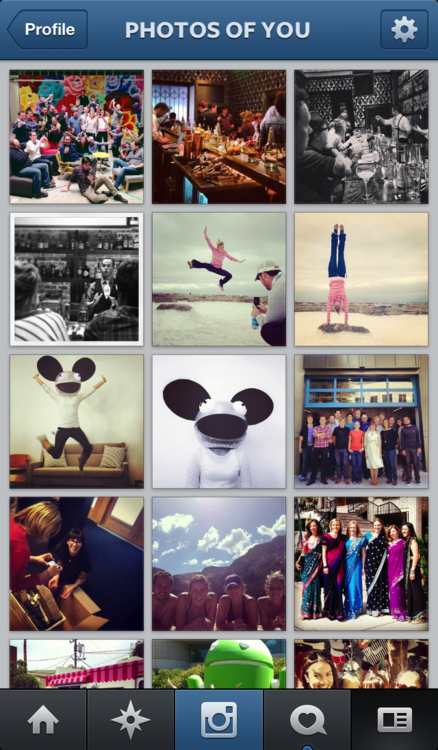
Instagram is rolling out an update which allows iOS and Android users to tag their friends, themselves, celebrities or brands in their photos – a similar feature to that which helped popularise Facebook in its early days. Previously, users had to ‘@’ mention their friend’s in the comments section accompanying photos if they wanted to tag them.

When a user is tagged in a photo they will receive a notification and the photo will appear in the “Photos of You” section of their profile. Like Facebook, users can detag themselves and change the settings so that photos require approval before they appear on their profile.

Having uploaded a photo, users will be given the option to tag people or brands by tapping on them. There is also the option to tag old photos. To see who’s tagged in any photo in their feed users just have to tap the photo, otherwise the tags remain invisible. Only the user who uploaded the photo can tag it, confirmed Instagram in their announcement post:

Today, we’re excited to introduce Photos of You and bring you a new way to share and discover stories on Instagram. When you upload a photo to Instagram, you’re now able to add people as easily as you add hashtags. Only you can add people to your photos, so you have control over the images you share. And it doesn’t stop at people—you can add any account on Instagram, whether it’s your best friend, favorite coffee shop or even that adorable dog you follow.
The benefits of the new tagging feature are obvious: users will be able to collate photo albums of themselves and flick through those of their friends. More importantly, it will be easier to capture and organise special moments with friends, making the photos simpler to rediscover in the future. Brands will also greatly benefit from the photos, as the public will be creating hundreds of great images featuring their logos and products which could then be used for promotional material.

Problems could arise for brands and celebrities, however, as every single photo they are tagged in will appear on their page or, if they select the image pre-approval option, they will have to sift through dozens of images, requiring time and effort. Also, there could be people taking photos which contain negative or inappropriate themes within them. Of course, companies could use this to their advantage, using positive and negative photos for sentiment analysis.

An Instagram spokesperson told TechCrunch that “a year of work went into building the new tagging and Photos Of You section”. The Photos Of You section won’t be published until May 16th, giving users enough time to get to grips with the new tagging feature, as well as to decide what tagged photos of themselves they want to be visible to the public. According to the same spokesperson, Instagram has not thought much about how to monetise the tagging feature yet. However, tagging will undoubtedly increase Instagram’s active user figures, as people will want to see photos that they are tagged in after receiving a notification.

What do you think of Instagram’s new tagging service?

Thursday, 18 April 2013

Facebook Tests Links With Larger Photos, Adds Groups To Timeline

large-image-link-post
Facebook is testing two types of new link in the news feed, one with larger photos and another with icons denoting the link source. The social media giant has also given groups their own separate box on the newly designed timeline.

The new design for posts containing links takes full advantage of the recent news feed redesign, which focuses on providing the user with better, more image-focused content. The first new link being tested is dominated by a picture from the article, which takes up the entire width of the news feed at the cost of a title and summary. Instead, the links source and a sentence from the article sit above the image. Clicking on the photograph takes you to the article – before, it opened the image in a larger lightbox.

The second new link being tested is similar to the current style, with an image on the right and a headline and description on the left. However, the test contains the emblem and the name of the source site across the bottom of the link. Both of the links being tested take full advantage of the redesign’s wider news feed. It is as yet unclear whether the links can contain videos instead of pictures or not, but considering the fact that clicking the photo takes users to the article, it is unlikely – users want videos to play when they are clicked.

It’s been a busy few days for the Facebook team, as they have also added a new groups section to the redesigned news feed. Only open groups that the user has accepted an invite to will appear in the box, closed or secret groups and groups with an invitation pending will not be shown.

Which of the tests do you prefer?

Tuesday, 16 April 2013

71% of Facebook Users Engage in 'Self-Censorship'


Facebook-sunglasses

Most Americans now know the feeling of typing something into a social media input box, thinking again, and deciding against posting whatever it was. But while it certainly seemed like a widespread phenomenon, no one had actually quantified the extent of this "self-censorship."

But now, new research based on a sample of 3.9 million Facebook reveals precisely how widespread this activity is. Carnegie Mellon PhD student Sauvik Das and Facebook's Adam Kramer measured how many people typed more than five characters into Facebook content-input boxes, but then did not post them.
They term this "last-minute self-censorship." The research was posted to Das' website and will presented at the Association for the Advancement of Artificial Intelligence's conference on Weblogs and Social Media in July.

The numbers are impressively large. Fully one-third of all Facebook posts were self-censored, according to the method Das and Kramer devised, though they warn they probably captured a substantial number of false positives. Seventy one percent of all the users surveyed engaged in some self-censorship either on new posts or in comments, and the median self-censorer did so multiple times.

Perhaps the most interesting part of the study was the demographic correlations with self-censorship. Men self-censored more often, particularly if they had large numbers of male friends. Interestingly, people with more diverse friend groups — measured by age, political affiliation, and gender — were less likely to self-censor.
While the researchers declined to speculate in this study about why people may or may not have self-censored, earlier research with a small group of users found five reasons people chose not share what they'd written: aversion to sparking an argument or other discussion, concern their post would offend or hurt someone, felt their post was boring or repetitive, decided the content undermined their desired self-presentation or were just unable to post due to a technological or other constraint.

For Facebook users, the main takeaway here is probably: Feel free not to share. Facebook, on the other hand, has to have a more complex relationship to this research. Their interaction and business models depend on sharing, but it's not hard to imagine some circumstances in which it would be better not to share: racist content, say.

Das and Kramer say future research should address when the non-sharing is "adaptive," (which I think means good, in this context) and when, in the words of Das and Kramer, "users and their audience could fail to achieve potential social value from not sharing certain content, and the [social-network service] loses value from the lack of content generation."

Image via Manjunath Kiran/AFP/GettyImages

Thursday, 28 March 2013

New “Tracking Specs” Allow Facebook Advertisers To Track Specs Without Optimising Them


Facebook has introduced tracking specs on the ads API, a new tool which allows Facebook Advertisers to track specs without having to optimise them as well.

Before, only conversion specs were available to advertisers on the ads API. Conversion specs allow advertisers to detail and track their ads, but also automatically optimises ads for actions such as page likes and click-throughs based on the engagement they receive and the ads settings.
By using Optimized CPM, advertisers ensure that Facebook automatically targets users who are more likely to engage with their ads in the way defined in the conversion specs. However, advertisers wanted to be able to track their ads without having to optimise them.

According to the description on the Facebook developers pages:

Tracking specs allow you to track what actions are taken by users interacting with your ad. Tracking specs will only track, it will not optimize for that action nor does it charge based on that action. Please see conversion spec to learn how to create ads that optimize for a specific action.


Now, both conversion specs and tracking specs are available to advertisers using Facebook’s ads API. “Advertisers can define conversion specs to optimize for, then use tracking specs to measure results”, suggests Inside Facebook. Like conversion specs, tracking specs can be used to measure the effect of any Facebook ad type.

What do you think of the new tracking specs?

Tuesday, 26 March 2013

Facebook Finally Adds 'Reply' Option to Comments


Facebook-comments

Facebook announced on Monday it is rolling out a new feature so users can reply directly to comments left on their page. Finally.
Followings months of testing, the social network aims to make navigating through conversation threads easier with the new Replies feature. This means that, instead of having to leave a response to a friend's comment way after new ones have been added, you will be able to address each individual comment. Responses will be posted under the original comment too. 

Facebook Replies

The site is also prioritizing comments based on engagement — the most active and popular ones will surface to the top of your posts. This will be especially helpful for pages with thousands of followers.

"You and your readers will have the ability to reply directly to comments left on your Page content and start conversation threads, which will make it easier for you to interact directly with individual readers and keep relevant conversations connected," said Vadim Lavrusik, Facebook's journalism program manager, in an official blog post. "Also, the most active and engaging conversations among your readers will be surfaced at the top of your posts ensuring that people who visit your Page will see the best conversations."

Facebook Replies


For now, threaded replies will be automatically applied to profiles with more than 10,000 followers and opt in for brand Pages until July 10, 2013. To opt in, visit the Replies option through the Page admin panel.

"At launch, this feature will only be available on desktop and we plan to make it available in the Graph API and mobile in the future," Lavrusik added.

Mashable composite, Images via iStockphoto, crossroadscreative, and logo courtesy of Facebook

Tuesday, 19 March 2013

Pinterest’s New Look Is Rolling Out To All Users

image
Pinterest’s redesigned look, which went through a short testing period in January, is being rolled out to all users over the next few weeks.

At the beginning of 2013, Pinterest asked a few users to test an updated version of the social pinboard site. Pinterest took the testers’ feedback into account and made a few more tweaks to the site. Earlier today, Pinterest announced that the update was being released to everyone, informing users on the Pinterest blog that they would see an invite to the new look soon.

Enlarged pins have been improved, with more information surrounding a pin after it has been clicked. Surrounding a chosen pin are pins from the same board, pins from the same website and pins from other people who also pinned the enlarged pin. Pins from the latter group are laid out exactly as the would be on the home page, as well as on individual boards. Pins from the same board are also laid out in a similar fashion, but only as images – without repins, likes or comments.

image
Mobile users won’t be able to see the pins from people who also pinned the enlarged pin just yet, but Pinterest say that the feature will be introduced to Android and iOS users soon.

Pinterest has made significant changes to the foundation that the website is built upon, making it easier to update and simpler to use. Pinterest didn’t want users to have “to learn anything new”, so they’ve made “some subtle but useful changes”. For example, pins are bigger so that there is more to see.

Also, Pinterest “responded to some feedback from pinners who told [Pinterest that] they hated losing their place while browsing. Now, when you scroll through pins and click on something that interests you, the back button lands you right back where you were no matter how far you’ve gone.”

What do you think of Pinterest’s new look?

Tuesday, 5 March 2013

Facebook Tests New Timeline And ‘Like Page’ Button, Announces News Feed Redesign


image
Facebook has begun testing a new profile page design in New Zealand, with a smaller toolbar beneath the cover photo and an off-centre Timeline. A new ‘Like Page’ button is also being tested.

The toolbar now consists of text boxes rather than iframes, with some of the original tabs moved elsewhere on the page: the About, Friends, Photos and More tabs remain, joined by a Timeline navigation button, but Maps has been recategorised into the Places section and Followers is now in the More tab.

There are Message, Call and options buttons, the latter denoted by the cog emblem, at the bottom corner of the cover photo, as well as an add friend box, which becomes ticked when activated.

image


A few other sections of the timeline page have been rearranged: the comments section has been moved from left to right, with the activity section beneath, and the About box has been enlarged, with defined sections for job, education, birthplace and location information.

There is also a new three-by-three photos box of friends on the left of the page as opposed to the original two-by-four rectangle. Notes, Likes and Apps are beneath the Friends box and the Places section.

imageThis is the third redesign to be tested in a matter of months, with the off-centre timeline introduced in October and then adjusted a few months later. The previous timeline redesign was also originally tested in New Zealand.

The Redesign also includes an updated link post when articles are shared on Facebook. A new ‘Like Page’ button has been added to the bottom right of links to articles and other offsite content posted on Facebook, allowing friends of the sharer to like the Facebook page of the article’s source.

The new ‘Like Page’ button, if introduced to Facebook users worldwide, will certainly help to drive traffic to company Facebook pages. Its inoffensive yet omnipresent placement, appearing, as it does, in the corner of a friend’s recommendation, will make it an invaluable tool for businesses on Facebook.

In related news, Facebook has sent out invitations to a press event on March 7th, where the company will unveil a News Feed redesign.

The News Feed hasn’t been updated significantly since September 2011, so the announcement has many in the social media marketing world excited.

For a slideshow of screenshots of the Timeline redesign go to Mashable.

What do you think of the new Timeline? Are you looking forward to the News Feed redesign?

Thursday, 14 February 2013

Six Steps to Social Media Success for Your Business


Social media marketing is a growing trend among businesses. It is a great way to reach out and grow your audience and in turn, grow your business. There are millions and millions of people who are currently using social media as a way to keep up with the world, and all these people could possibly see your business and become customers. There are a few things that you need to know if you want to make social media marketing work for your business.

First of all, you will want to decide what social media site you want to use. If you are already familiar with one or two sites in particular, you might want to start there. If you don't have a starting place in mind, ask your customers what site they like best. Depending on the type of business you have and your audience, it will determine the social media site that will be best for you.

Once you decide on where to start, begin by creating an account and a profile. Add as much information as you can to your profile. It is important that you make your profile a good reflection of your business and have enough information so that someone who is not familiar with you can learn about what you have to offer. Also, make sure the information is spelled correctly and that you use good grammar.

You want your profile to be professional looking so your customers know that you are a professional business. It is also a great idea to add pictures to your profile page. Pictures can show your viewers what you have to offer, more about you, or simply happy customers. Be sure to add helpful descriptions to your pictures, too. Don't leave out contact information. You never know when someone will want to get in touch with you to ask questions or make a purchase.

Setting up your page is important, but getting followers is of equal importance. The more followers you have, the more you can multiply your presence. Start by asking your friends and family to follow you. You can then ask them to share your page with their friends and family members. Hopefully this will get you quite a few followers as more and more people are exposed to your profile.

You should also share your social media page links on your website or in your place of business. You can run special promotions to get people to like your page and start following you. You may hold a contest and require people to follow you to enter the contest. Or, you might choose to offer a free sample, free shipping, a certain percentage off or some other enticing deal to get people to your page to follow you.

You should be active on your social media page. You do not need to spend hours and hours a day there, but check in regularly throughout the day to post a quick status update (relevant to your business), answer questions and reply to concerns. You want to interact with your followers and show them that you care about them and what they have to say. If you find that you aren't getting much interaction, start asking questions on your page. Be sure that you communicate, too.

Social media marketing is a great way to get out there market your business and make a presence for yourself. Use the tips shared here and you can make the most of your efforts.

Article Source: http://EzineArticles.com/7501516

Tuesday, 5 February 2013

Facebook Re-introduces Photo Tag Suggestions


Facebook has reintroduced photo Tag Suggestions in the U.S. having suspended the feature temporarily last year. It was suspended in order to make some technical improvements but has now been brought back.

The facial recognition feature was first distributed across the United States in 2010 and was pushed out to other countries in mid 2011.

It doesn’t look as if Facebook has made any changes to privacy settings with the feature, and that it is still a default setting. Facebook says that the feature has been brought back so that users can use facial recognition “to help them easily identify a friend in a photo and share that content with them.”

“This is the same feature that millions of people previously used to help them quickly share billions of photos with friends and family.”

The social network uses similar software to that found in many image editing tools in order to match new images to other photos that someone’s been tagged in. Photos that are similar to one another are put together and Facebook will suggest the name(s) of your friend(s) for the photo.

The square that finds a face in a photo will suggest the name of a Facebook friend that it believes it to be. The site hopes that this will simplify the process of tagging people, especially if the same friend appears in multiple uploaded photos.

 Facebook re enables Tag Suggestions facial recognition feature in the US, on by default for all

Facebook announced the change in a Facebook and Privacy post but this could mean that many users will not have noticed it. The featured can be turned on or off by the users should they choose to do so.
 
To remove this feature from being default, select the tool icon in the top right corner of the page and then click on ‘Timeline and Tagging’ on the left hand side. At the bottom of the screen is an option that begins “Who sees tag suggestions . . .” which can be edited on the far right side.

For some, this may merely say ‘unavailable’ in which case the feature has not yet been distributed to you. Otherwise, a preference of either ‘Friends’ or ‘No One’ can be selected.

To get more information on Tag Suggestions and face recognition, go to the Facebook Help Centre.

Do you like Tag Suggestions? How useful is its inclusion?

Let us know your thoughts in the comments below.

Thursday, 24 January 2013

Top 10 Social Media Marketing Tips for 2013


Many social media sites started out as personal sites but social media marketing has become one of the most powerful online strategies for businesses, online and offline.

In 2002, Friendster was launched in the U.S and then in 2003 MySpace began.
Next to be launched was Facebook in 2004. Facebook was originally started for students but quickly spread to be much more. Twitter was born two years later in 2006. Pinterest, said to be the fastest growing site ever, was launched in 2010.

All these sites, along with others, have become powerhouses in social media marketing. As each year passes the possibilities continue to grow and expand. There probably are not many businesses left that do not engage in social media marketing.
These social sites are continually growing, expanding and changing and it can sometimes be difficult to keep up with these changes. Below are the top ten tips to help your social media marketing in 2013.

1. Make your posts more relevant - When people first started using the social sites they were posting things like "Going shopping today with the kids. Wish me luck!" The social sites have grown and changed. You need to start posting more relevant information. Make it about your readers and followers, not about you. Post solutions, inspiration, and interesting facts that can be useful and helpful.

2. Utilize features and tools - Social sites are increasing the possibilities for your business with more tools and features than ever before. Take stock of all these tools and learn to use them for the benefit of your followers and your business.

3. Visual Marketing - Marketing is going visual and you need to do the same. Embed text and your business info in relevant graphics to post. Pinterest, using image sharing, has broken records with its growth. Pictures are also the mostly widely used and shared method of posting on Facebook. When people share your images you want them to see your website link or other relevant info.

4. Help Your Clients/Readers - No matter what business you are in, you cannot provide solutions to all your clients' needs. Be willing to post links, information and resources of other businesses that can help your clients where you cannot.

5. Use Your Analytics - Review your analytics regularly to see what is working and what isn't. Are people visiting one social site more than others? When are people visiting your pages? Find out everything you can from your results. You can learn a lot from your analytics but you must utilize them to reap the benefits.

6. Host Events - Hold regular events such as giveaways, seminars, chats, networking parties, promotions, etc. Facebook has recently updated their event feature so it is easier and more efficient.

7. Connections Not Sales - Use your social media pages to connect with your potential customers not for sales. You want to use social media to share information, respond to questions and comments and to showcase what your business is about. You don't want to continually bombard your social sites with sales pitches and ads. Help your followers find solutions, do not pitch to them.

8. Slideshare - Slideshare is predicted to be the fastest growing social site in 2013. Slideshare will allow you to share your presentations with millions. You can also share documents, PDFs and videos. The possibilities are endless with this Slideshare.

9. Google+ - Google+ will be more important to your business. By being on Google+, you will be able to take full advantage of Google's many services and tools. It hasn't the social power of some of the other sites but it is a central part of Google and you should be a part of it.

10. Use Fewer Social Sites - Concentrating your marketing efforts to a few of the better producing sites is more effective than spreading yourself too thin over many of the social sites. The time it takes to successfully participate in social media is substantial so you need to build a strong presence on the sites that deliver rather than trying to dominate them all.

Social media marketing is expected to reach new and unequaled heights in 2013. Don't let your business be left behind. Become active with social media. Really get involved. Make new connections and post relevant visual items. Make it about your followers and clients, not about what cereal you had for breakfast!

Article Source: http://EzineArticles.com/7467039

Thursday, 13 December 2012

New Facebook Privacy Settings Rolled Out To Users


New privacy and sharing settings will be distributed to Facebook users by the end of the year.
A Facebook release has said that: “We continue to strive toward three main goals: bringing controls in context where you share, helping you understand what appears where as you use Facebook, and providing tools to help you act on content you don't like.”

The sharing platform has released a preview of some of the new options that can be seen in the menu.
Privacy settings could previously be found under different menu paths but will soon all be organised into one place called Privacy Shortcuts.
A new looking Activity Log will let users see more information on their personal data, their photos and all sorts of details regarding their Facebook activity.

Updated Activity Log

A Request Removal Tool has been put into place so that users can ask for photos they disapprove of to be taken down by the person who uploaded them.

If a user should choose to hide something from their Timeline, Facebook will notify them if the content may still be shown in news feeds, searches, or anywhere else on the site.

Hidden Education

Also, Facebook apps will have to make two separate requests to gain access to your personal information and post it to your Facebook account.
All users should be seeing these changes by the end of 2012.

What do you think about the privacy updates? Have you had any issues before?
Let us know your thoughts in the comments below

Thursday, 18 October 2012

How Social Media Can Benefit You


There are many different ways in which you can use social media to help bring attention to your company and the products and services that you offer. Many times companies don't know how to successfully include social media into their existing marketing plan; what we are going to do is to help you understand the different ways in which social media can help your business grow.

· Become More Visible - Using social media as part of your marketing plan is a great way to increase the awareness of your business. By creating a fan page you are inviting the public to visit your page and discover everything that you have to offer.

· Bring In More Traffic - Participating in some type of social media is an excellent way to help increase the amount of traffic that your website sees. By providing fans or followers new and interesting information on upcoming product releases you are awakening their curiosity and they are more likely to visit your website to find out more. While they are there investigating the new products, they may also decide to make a purchase.

· Increase Your Likability - Becoming active on social media websites is a great way to provide your business with a face and personality. Visitors who see this are more inclined to trust your company over another because they are now able to develop a connection with your brand. It will also give your business a sense of caring for the public and what they think about your products or services.

· Invite Interaction - Your fan page is a great resource when it comes to discovering how the public views your business or products. You can also ask your fans what they would like to see you develop next or if they have any problems with any of your existing products. You can obtain a lot of valuable information by inviting your fans to interact with each other or even you.

· Target Your Marketing Efforts - Creating a fan page is also a great way to focus your marketing efforts to specific groups of customers. You are also able to promote any specials that you are currently running. You may also want to create specialized discounts that are only available to fans of your page.

Social media has created a new avenue that wasn't available in past years. You are now able to reach thousands of people with one simple update to your page. This allows you to create targeted marketing plans that are geared towards your online activity. If you haven't already embraced the age of social media, the time has come. By not actively participating in social media you are missing a great opportunity to grow your customer base.

Article Source: http://EzineArticles.com/7331847

Thursday, 27 September 2012

Facebook Groups Adds Dropbox Integration


Now if you want to share files with friends via Facebook Groups, you can do so via Dropbox.
“When the owner of the file makes updates, those updates will also be shared back to the group. And, just like other posts to Facebook Groups, people can like or comment on the content,” a Facebook representative told Mashable.
Since edits are shared directly back to the group, the functionality could be ideal for group projects where several people need access and the information is constantly changing.
Dropbox and Facebook also see the feature being used to share things like videos of a birthday party with your “family Group,” or class notes with a study group you have on the social network.
Documents, photos, and videos can all be shared from your Dropbox account onto your group’s wall, and all of that content can be viewed via web as well as on a smartphone or tablet.
Facebook rolled out file sharing for groups in May of this year. With the feature users can upload file types up to 25MB in size, excluding music and executable (.exe) files.
To get started using Dropbox with Facebook you just have to click the “Add File” button on your Group’s page and then link your existing Dropbox account (or create a new one).
The new feature will start gradually rolling out to Facebook users Wednesday.
Do you have the new Dropbox functionality in groups yet? Let us know what you think of the new feature in the comments.

Thursday, 6 September 2012

20 Tricks to Make Facebook Better

Facebook is by far the largest social network on the web. While Mark Zuckerberg has made plenty of great calls in its design, the site — and the way people use it — isn’t as streamlined as it could be.

These 20 tips, tricks and tools will give help take your Facebook experience to the next level. From simple settings options you may have overlooked, to browser plug-ins dedicated to making the social network even better, you’re sure to find something on this list that will make your Facebook time even more addicting than it already is.

Tweak Your Facebook Settings

1. Appear Offline to Certain Friends

By opening your Facebook chat window, clicking the settings icon in the upper right corner and then navigating to “Advanced Settings,” you can customize your chat experience by appearing offline to certain people on your friends list. This tweak will be especially helpful for those of you with chatty acquaintances who like to talk your ear off when you’re online.

2. Reposition Your Timeline Photos

When uploading a new photo, it might not always appear on your feed the way you intended. Particularly long or wide photos have a tendency to be cropped awkwardly, but you can fix this rather easily. By clicking “Edit Photo” from your Timeline page, you gain access to a “Reposition Photo” option. Using this tool, you can move your photo around the preview window so that it appears as you intended.

3. Add Photos to Your Worldly Travels

If you’re a fan of Facebook’s “Places” feature, you can very easily decorate it with pictures to show off your various activities all over the world. On the main Places page, simply click “Add Photos to Map” and start tagging away! If you frequently upload photos directly to your Facebook profile using a mobile app for iPhone or Android, you might find that your map is already pretty well populated.

4. Easily Hide App Notifications

By going into your account settings, navigating to the “Notifications” tab on the left side of the page, you can browse the applications that have permission to populate your news feed. If find that a friend has spammed your feed with an excessive number of app notifications, simply deactivate the offending app. It’s easier than breaking off the friendship.

5. Upload Photos in High Resolution

Sometimes you’ll find that a gorgeous photo you wanted to share with your friends appears tiny and blurry after adding it to your social network profile. Remedy this by going into your Facebook albums and, before uploading a photo, click the “High Quality” box.

6. Use the “View As” Option to Tweak Your Appearance to Specific Friends

Knowing what your friends can see on your Facebook Timeline is an invaluable tool to ensuring your virtual reputation stays intact. From your Timeline page, click the settings icon next to “Activity Log” and then click “View As.” From here you’ll be able to see what specific friends see when they visit your page.

7. Download Your Entire Facebook History

Ever wanted to browse your entire Facebook profile at once — including every status update you’ve ever submitted? Facebook makes it easy. Under your Account Settings page, a small link will appear at the very bottom of the options list. Click “Download a copy of your Facebook data” to begin the process of securing your entire archive.

8. Forward Your Facebook Conversations

Having to repeat yourself is annoying in day-to-day life, and it’s even more of a bother when online. Rather than copying and pasting directions or instructions to multiple people, click the “Actions” tab at the top of any Facebook message thread to access the option to forward it to others. Ta-da! No more double-talk!

9. Turn Chat Sign-in Off by Default

Can’t stand endless chat when you’re simply browsing your status updates? No problem. Click the settings icon in the main Facebook chat window, and click “Turn off chat” to have all future messages sent to your inbox, rather than pop-up in realtime on your screen.

10. Use Facebook to Design Your Business Card

If you’ve put a lot of work into making your Timeline page reflect exactly who you are, consider using it as a pre-designed business card. Clicking the “About” link — located under your name on your Timeline — lets you browse your social network details. In the Contact Info window is a small business card icon that will direct you to Moo.com, where you can customize a Facebook-flavored business card and place an order.

Web Tools That Optimize Facebook

11. Analyze Your Facebook History With Wolfram Alpha

For the most comprehensive breakdown of your entire Facebook history, Wolfram Alpha can’t be beat. Simply type “Facebook Report” into the main search bar, approve the app’s use of your Facebook data and wait for the system to break down your history. Once it’s finished, you’ll be treated to a seemingly endless number of graphs and data points showing your update history, most-liked photos and much more.

12. Schedule Facebook Updates With Sendible

Believe it or not, thieves are big fans of Facebook. By finding out when you’ll be away from your home, security experts believe would-be robbers target those who go on a Facebook hiatus. Sendible — an application that allows you to schedule updates even when you’re not near your computer — can keep your online persona active, even when you can’t.

13. Use Twitter to Update Facebook

Sometimes you just don’t have enough time to keep all your social networks up to date, but thankfully Facebook and Twitter play nice together with a little tweaking. Head to the Twitter app page on Facebook to begin the process of syncing your virtual social lives. After authorizing the Facebook app via Twitter, all your tweets will appear on Facebook as status updates.

14. Export Your Facebook Calendar to Your PC

Make sure you don’t miss any important events by exporting your Facebook calendar to either Microsoft Outlook or Apple iCal. Head to your Facebook calendar (located under the “Events” tab on the Facebook navigation bar) and click the settings icon. Click “Export,” and then choose either your Facebook birthday list or upcoming events. Your desktop’s calendar app should launch immediately, making the process even more streamlined.

Chrome Extensions for Facebook

15. Facebook Photo Zoom

Using this extension, you no longer have to click on the photos in your news feed in order to view them in full size. Simply move your mouse cursor over the image thumbnail and the larger version will pop up right in front of you. You can even adjust the zoom by moving the mouse back and forth over the photo itself. It’s like magic.

16. Revert Facebook Photo Viewer

If you’re not into real-time photo zooming, this extension turns back the clock on your Facebook’s photo feature. Rather than displaying pictures in the new “Theater” layout, photos will appear on their own pages, complete with the full comments section and “Like” options.

17. Facebook Chat Notifications

Have you ever left a Facebook tab open on your web browser and missed an urget message from a friend? This handy plugin produces a pop-up window on your desktop to notify you when someone needs to chat, ensuring you never miss an important bit of info.

Firefox Add-Ons for Facebook

18. Like the Page

If you’re a Firefox user, you can use this add-on to instantly share any web page they come across, even when the site doesn’t have a built-in Facebook share button. A small “Like” icon will pop up at the bottom of every browser window, and all it takes it a click to share your find with the world.

19. FB Purity

This plug-in returns your Facebook to an earlier day, back when spammers and useless clutter wasn’t a hinderance to your browsing habits. You can hide any type of notification you wish, including birthdays, relationship updates, tagged photos, links and much more. You can make your social experience as simple as you wish.

20. Facebook Auto-Logout

Do you hate it when you accidentally leave yourself signed in to the social network, only to come back to missed chat messages and anxiety over whether someone else was browsing your digital life? This handy add-on will automatically sign you out of your Facebook windows if you’ve been inactive for too long, ensuring that nobody can snoop your info.

Thursday, 30 August 2012

Twitter Launches Certified Products Program


Twitter launched a new certified products platform Wednesday. The program is initially launching with three verticals Twitter says are “based on the needs we see from partners every day” — Engagement Products, Analytics Products, and Data Reseller Products.

“With this program, we’ve identified areas where we see huge demand for innovation on Twitter’s platform, Twitter representative Seth Binderngel, said in a post on the company’s developers blog.

“We’re launching today with 12 partners, and this is just the start. If you have a unique product that fits in at least one of the product verticals, solves a market need and has the potential for a large impact, please get in touch,” he added.

The 12 partners launching today are Attensity, ExactTarget, HootSuite, Mass Relevance, Radian6, Sprinklr, SocialFlow, Crimson Hexagon, Dataminr, Topsy, DataSift, and Gnip.


Twitter recently launched API restrictions that prevent third-party developers from accessing large amounts of Twitter’s data at once. Under the new rules, once a third-party app has 100,000 users it has to contact Twitter and get permission for additional access so its user-base can grow, or begin to work with Twitter directly. Existing third-party apps at the time of the announcement earlier this month can double their existing user base before having to contact Twitter to continue.

The company also limited the number of API calls that can be made each hour, making it difficult for some existing service – such as those who want to pull real-time analytics – to function.

If you’re a developer and would like to apply to be part of Twitter’s new verified products program you can do sohere.

Get Hosting for $4.95 a month